---
title: Custom Dashboard Cell
description: Create a custom Table Dashboard cell
---
## Motivation
With the Table Dashboard introduced in March 2022 we have created upstream components configurable to suit most customer needs. A list of these components can be found here: [Table Dashboard Cells](/guides/editor/table-dashboard-cells/llms.txt).
We would highly recommend using these upstream components for several reasons:
- Less custom code: This reduces your implementation and maintenance costs
- The upstream components are better integrated with other features, for example: dashboard filters, metadata plugins and indexing
However, we also offer custom read-only cells for times when you have small requirements to display in a Table Dashboard. For example, if you have a custom metadata plugin you would like displayed or presented in a different way. The example below takes a publish control field and displays it in a specific way.
## Guide
Below is an example dashboard cell showing the date and time property for a scheduled publish document using the new [publish control](/guides/editor/publish-control/publish-control-basics/llms.txt)
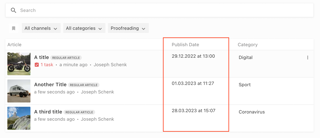
Custom Table Dashboard cells are passed two props, the document and custom options.
```vue
{{ publishDate }} at {{ publishTime }}
```
This must be registered in the vue component registry at the editor:
```js
liEditor.vueComponentRegistry.registerComponent({
type: 'tableDashboardCell',
name: 'customPublishTimeCell',
component: require('../custom-publish-time-cell.vue').default
})
```
And can be configured for use in a Table Dashboard in the Project Config editor in the [editor settings](/reference/project-config/editor-settings/llms.txt) in the server:
```js
columns: [
{
label: 'Article',
minWidth: 375,
growFactor: 2,
priority: 1,
componentName: 'liTableDashboardCellMain',
componentOptions: {
image: {
metadataPropertyName: 'teaserImage'
},
clampTitle: false,
showContentType: true
}
},
{
label: 'Publish Time',
componentName: 'customPublishTimeCell',
minWidth: 200,
growFactor: 0,
priority: 2,
componentOptions: {
// Custom options passed to the component
}
},
{
label: 'Category',
metadataPropertyName: 'category',
editable: false,
minWidth: 200,
growFactor: 0,
priority: 3
}
]
```
This dashboard is pictured above and has three columns - the document title with a teaser image, scheduled publish time and the category.