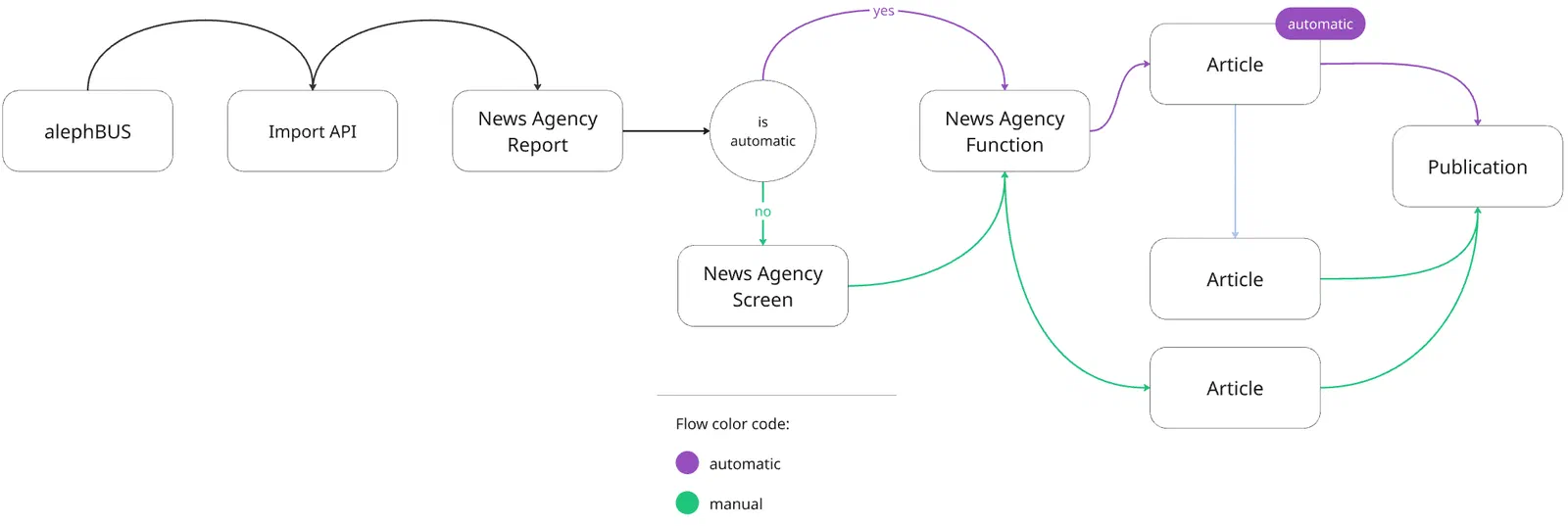
Livingdocs offers built-in support for News Agencies, enabling editorial teams to review and process news agency reports directly within Livingdocs. With a single click, reports can be copied into regular Livingdocs articles, ready for editing and publication.
The News Agency integration supports two kinds of import flows: manual flows and auto-publish flows.
Manual Flow
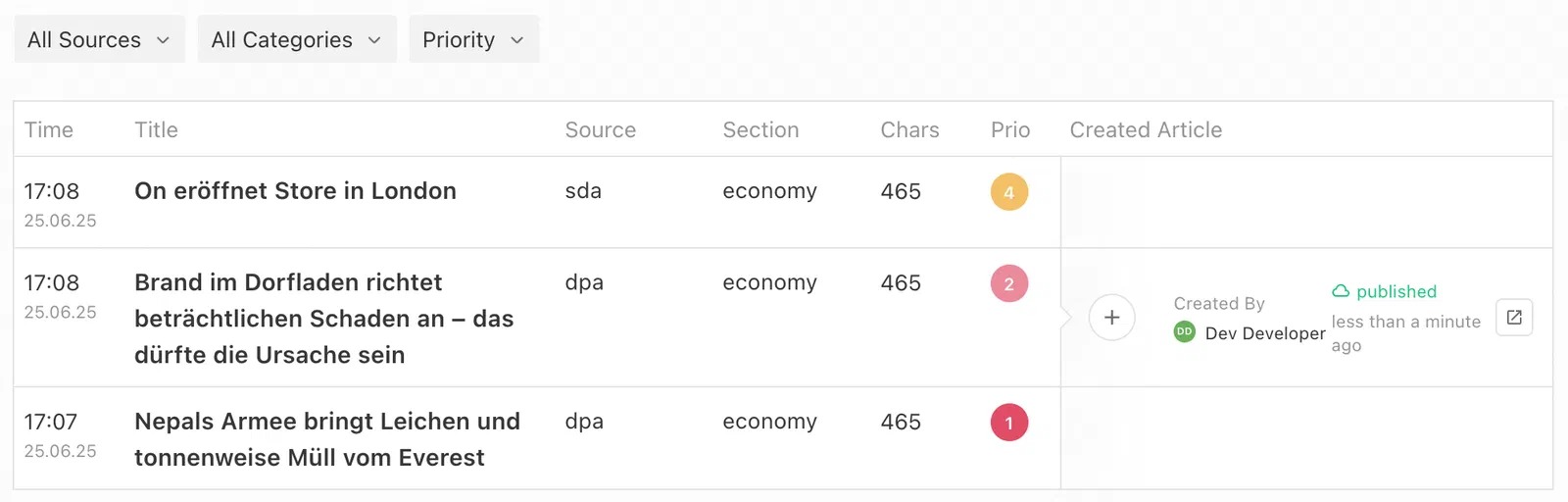
Manual flows let users decide which news agency reports should be turned into articles. As a result, they are more visible to users, whereas auto-publish flows are designed to operate in the background.
- Import: News agency reports are imported via the Import API. They must be imported into a pre-configured content type with the handle
liNewsAgencyReport. This content type is pre-configured with a fixed set of metadata properties and content components. It is created automatically once the integration is set up. - Triage: Imported reports are displayed on a dedicated news agency screen. While this is the recommended way to work with news agency reports, it’s also possible to configure other dashboards to display this content type.
- Article Creation: On the news agency screen, users can copy a report into a regular article by clicking the plus button. This action triggers the configured news agency function to transform the report into a regular article. It creates an independent copy that no longer receives updates from the original report, though it remains linked to the original news agency report. This relationship is displayed in the document info panel of the article and on the news agency screen next to the report from which it was created.
- Editing: The resulting article behaves like any other article in Livingdocs: it can be edited, published, and managed without restrictions.
Auto-publish Flow
Unlike the manual flow, the auto-publish flow requires no user-interaction. It enables publishing articles received from news agencies automatically.
- Import: Auto-publish reports are imported via the Import API to content type
liNewsAgencyReportas well. However, the metadata propertyautoPublishmust be set totrue. - Triage: This automatically bypasses the manual review process. Auto-publish reports do not appear on any news agency screens.
- Article Creation: A new article is automatically generated using the configured news agency function. The article is then immediately published without any user interaction. Auto-published articles are unpublished two weeks after their publication.
- Editing: When accessed by users, auto-published articles are read-only. They continue to receive updates made to the original news agency report, which are also automatically published. Users may choose to convert the auto-published article into an editable article. Once converted, it will stop receiving updates from the original report.
Setup
With this high-level overview in mind, this section will guide you through the configuration steps needed to enable the News Agency feature.
1. Configure the News Agency Feature
Set up the feature using the newsAgency property:
newsAgency: {
  // Required. References a registered news agency function. This function is
  // used to copy news agency reports into regular articles or, in the
  // auto-publish flow, to also update already copied articles.
  functionHandle: 'someNewsAgencyFunction',

  // Optional. Configures the news agency screens.
  screens: [
    {
      // Required. Handle identifying the news agency screen.
      handle: 'newsAgencyReports',

      // Optional. Title displayed at the top of the news agency screen.
      pageTitle: {en: 'Agency Inbox', de: 'Agentureingang'},

      // Optional. Defines the strategy used to search news agency reports.
      search: {strategy: 'simple'},

      // Optional. Further restricts the displayed news agency reports.
      // Regardless of baseFilters, only reports imported through manual flows
      // with the content type `liNewsAgencyReport` are shown.
      baseFilters: []
    }
  ],

  // Optional.
  // - Maps raw source values to descriptive or localized labels shown in the
  //   Livingdocs Editor.
  // - Defines what source display filter options appear on news agency screens.
  sources: [
    {label: 'afp', value: 'afp'},
    {label: 'dpa', value: 'dpa'},
    {label: 'sid', value: 'sid'}
  ],

  // Optional.
  // - Maps raw category values to descriptive or localized labels shown in the
  //   Livingdocs Editor.
  // - Defines what category display filter options appear on news agency
  //   screens.
  categories: [
    {label: {en: 'Politics', de: 'Politik'}, value: 'politics'},
    {label: {en: 'Economy', de: 'Wirtschaft'}, value: 'economy'},
    {label: {en: 'Sports', de: 'Sport'}, value: 'sport'},
    {label: {en: 'Feuilleton', de: 'Feuilleton'}, value: 'feuilleton'},
    {label: {en: 'Media', de: 'Medien'}, value: 'media'},
    {label: {en: 'Other', de: 'Sonstiges'}, value: 'other'}
  ],
}
2. Register a News Agency Function
The news agency function copies reports into regular articles or, in the auto-publish flow, also updates already copied articles.
It receives the parameters: document (a liNewsAgencyReport), userId, and projectConfig. It must return a document structure that will be used to create or update the document copy. Supported return properties include: title, contentType, metadata, metadataSource, translations, and content.
Register the function using the server API registerNewsAgencyFunction:
liServer.registerNewsAgencyFunction({
  handle: 'someNewsAgencyFunction',
  action({document, projectConfig, userId}) {
    return {
      title: document.title,
      contentType: 'newswireArticle',
      content: document.content,
      metadata: document.metadata.toJSON(),
      metadataSource: document.metadataSource,
      translations: document.translations
    }
  }
})
 If your news agency reports contain images, see Map Images in the News Agency Function to learn how to copy them into articles.
Since this function works with a liNewsAgencyReport, it’s important to understand the structure of this content type. The newsAgencyReport is pre-configured by Livingdocs and only supports a specific set of metadata properties and content components.
Content Type Config liNewsAgencyReport
{
  handle: 'liNewsAgencyReport',
  components: [
    {name: 'h2'},
    {name: 'p'},
    {name: 'ol'},
    {name: 'ul'},
    {name: 'li'},
    {name: 'image'}
  ],
  metadata: [
    {handle: 'title', type: 'li-text', config: {index: true, required: true}},
    {handle: 'lead', type: 'li-text', config: {index: true, required: true}},
    {handle: 'note', type: 'li-text', config: {index: true}},
    {handle: 'source', type: 'li-text', config: {index: true, required: true}},
    {handle: 'category', type: 'li-text', config: {index: true, required: true}},
    {handle: 'keywords', type: 'li-string-list', config: {index: true}},
    {handle: 'location', type: 'li-text', config: {index: true}},
    // Indicates the urgency of a report as an integer from 1 (highest)
    // to 6 (lowest).
    {handle: 'priority', type: 'li-system-priority', config: {index: true, required: true}},
    // Datetime of the original report which might differ from when it is
    // imported.
    {handle: 'datetime', type: 'li-datetime', config: {index: true, required: true}},
    // Automatically publishes the report using the auto-publish flow.
    {handle: 'autoPublish', type: 'li-system-boolean', config: {index: true}},
    // Sets an embargo on the report and any articles resulting from the it.
    {handle: 'embargo', type: 'li-datetime', config: {index: true}},
    {handle: 'language', type: 'li-language', config: {index: true}}
  ]
}
Design newsAgencyReport
{
  name: 'liNewsAgencyReport',
  components: [
    {name: 'h2', directives: [{type: 'editable', name: 'text'}]},
    {name: 'p', directives: [{type: 'editable', name: 'text'}]},
    {name: 'ol', directives: {items: {allowedChildren: ['li']}}},
    {name: 'ul', directives: {items: {allowedChildren: ['li']}}},
    {name: 'li', directives: [{type: 'editable', name: 'text'}], allowedParents: ['ol', 'ul']},
    {
      name: 'image',
      directives: [
        {type: 'image', name: 'image'},
        {type: 'editable', name: 'caption'},
        {type: 'editable', name: 'source'}
      ]
    }
  ]
}
3. Set Up the Resulting Content Type
The content type returned by your news agency function must be set up like any other content type in your project config. You can also reuse an existing content type that is already used for non-agency articles.
Since news agency flows use the same news agency function for both manual and auto-publish flows, the resulting document will have the same content type in both cases. The only difference is the newsAgencySource.autoPublish property.
News agency flows rely on publish control in the resulting document to support features like autoPublish and embargo. This means publish control must be configured correctly, otherwise, the news agency flow may fail:
- If using
autoPublishon import, you must enablepublishControl.unpublishScheduleon the resulting content type. - If using
embargoon import, enablepublishControl.embargo. - If using both
autoPublishandembargoon import, enablepublishControl.publishSchedule.
4. Set Up Dashboards
You can now add the configured news agency screens to your menu.
mainNavigation: [
  {
    handle: 'newsAgencyReports',
    label: {en: 'Agency Inbox', de: 'Agentureingang'},
    newsAgencyScreen: 'newsAgencyReports',
    icon: 'inbox-full'
  }
]
Additionally, you can create dashboards to display articles created from news agency reports. Use the following filter expressions to display articles created by one of the news agency flows:
// Created with manual flow
{key: 'newsAgencySource.autoPublish', term: false}

// Created with auto-publish flow
{key: 'newsAgencySource.autoPublish', term: true}
5. Import News Agency Reports
Now you’re ready to import news agency reports using the Import API. Since you’ll import documents of type liNewsAgencyReport, it’s important to know the supported metadata properties and content components of this content type (see above).
Properties that are important for the import logic:
systemName: Astringidentifying your importer, e.g.alephdam.id: Astringidentifying your resource on the external system. This Id should be unique, so that updates will be applied to the same report.checksum: An arbitrarystringwhich allows you to determine whether it’s an update.contentType: Astring, which always contains the valueliNewsAgencyReport.
POST /api/2026-09/import/documents

{
  "systemName": "alephdam",
  "documents": [
    {
      "id": "1",
      "checksum": "1",
      "contentType": "liNewsAgencyReport",
      "title": "How Leveraging Technology Intentionally Can Help Make...",
      "metadata": {
        "title": "How Leveraging Technology Intentionally Can Help Make...",
        "lead": "As the news publishing industry is increasingly catalysed...",
        "note": "Author: Livingdocs (Zurich), contact@livingdocs.io",
        "source": "sda",
        "category": "Economics",
        "keywords": ["Business", "Media"],
        "location": "Zurich",
        "priority": 3,
        "datetime": "2025-07-25T15:00:58.615Z",
        "embargo": "2025-07-25T15:00:58.615Z",
        "autoPublish": true
      },
      "content": [
        {"component": "p", "content": {"text": "From the content..."}},
        {
          "component": "image",
          "content": {
            "image": {
              "mediaId": "dHrZ7Ej8PyNK",
              "key": "2026/11/03/0a704a7b-18fc-4a74-a31b-9fbf0ae7beb3.jpeg",
              "originalUrl": "https://bucket-name.s3.amazonaws.com/2026/11/03/0a704a7b-18fc-4a74-a31b-9fbf0ae7beb3.jpeg",
              "url": "https://bucket-name.s3.amazonaws.com/2026/11/03/0a704a7b-18fc-4a74-a31b-9fbf0ae7beb3.jpeg",
              "width": 2048,
              "height": 1329,
              "mimeType": "image/jpeg"
            },
            "caption": "Some caption",
            "source": "dpa"
          }
        }
      ]
    }
  ]
}
Images
Added in: release-2026-11
News agency reports can contain images. Users see them when they open a report on a news agency screen or in a notification, and your news agency function decides what happens to them when a report is copied into an article.
Import Images
Images are sent as image components in the content array of a liNewsAgencyReport document, as shown in the import example:
- Media library entry: Each image must already exist in the media library. Import it first, e.g. with the Import Media Library Entries endpoint. Then fill the
imagedirective with the image attributes of the entry, including itsmediaId. - Caption and source: The editable directives
captionandsourceare optional. - Position: Images can appear at any position at the top level of the content, and there is no limit on their number.
An import fails if a component is placed where the design doesn’t allow it, such as an image inside a list, or if a component contains an unknown directive. To find out why an import failed, check the import status: the reason of a failed document describes the violation.
Map Images in the News Agency Function
Your news agency function decides if and how images are copied into the resulting article. Make sure it handles image components before you import reports with images.
If your design has an image component with the directives image, caption and source, you can pass document.content through unchanged. Livingdocs validates the returned content against your design, but not against the components the target content type allows, so make sure the target content type allows image.
If your image component has a different name or different directives, map the images in the function. In this example, the design has a figure component with a credit directive for the source:
liServer.registerNewsAgencyFunction({
  handle: 'someNewsAgencyFunction',
  action({document}) {
    const content = document.content.map((component) => {
      if (component.component !== 'image') return component
      const {image, caption, source} = component.content

      // Map the report's image to the figure component of your design.
      return {component: 'figure', content: {image, caption, credit: source}}
    })

    return {
      title: document.title,
      contentType: 'newswireArticle',
      content,
      metadata: document.metadata.toJSON()
    }
  }
})
To leave images out of the article, filter them:
const content = document.content.filter((component) => component.component !== 'image')
View Images in a Report
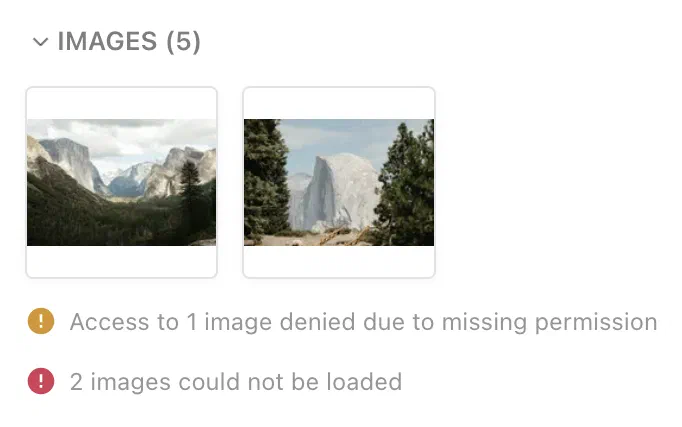
When a report contains images, they are shown in a collapsible “Images” section of the report. The section title shows the number of images.
Hovering over an image thumbnail opens a flyout with two actions:
- Go to media library entry: Opens the media library entry in a new tab.
- View details: Opens the image in a lightbox. Use the previous/next buttons or the arrow keys to cycle through the images of the report. This action is available on news agency screens, not in notifications.
Images that can’t be displayed are reported in a message below the thumbnails. This happens when the user lacks the permission to view an image, or when an image referenced in the report can’t be loaded. The latter hints at an image that wasn’t imported correctly.
Notifications
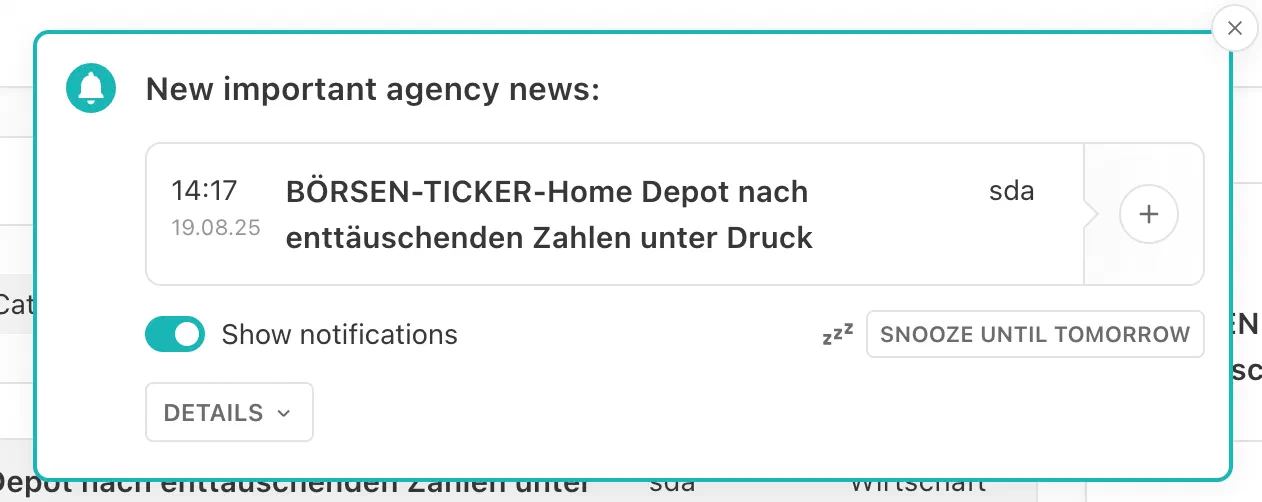
To ensure that users don’t miss breaking news while working on other topics, Livingdocs provides notifications for incoming news agency reports. These notifications appear throughout Livingdocs—whether on a dashboard, article, or in any other view. Users can directly create an article from a notification with a single click.
1. Configure News Agency Notifications
To enable notifications for news agency reports, extend the newsAgency property with a notifications property. This property defines the categories users can subscribe to for notifications. If notifications is missing or empty, users cannot configure or receive notifications.
newsAgency: {
  notifications: [
    {
      handle: 'politics',
      label: {en: 'Politics', de: 'Politik'},
      category: 'politics'
    },
    {
      handle: 'feuilleton',
      label: {en: 'Feuilleton and Media', de: 'Feuilleton und Medien'},
      category: ['feuilleton', 'media']
    }
  ]
}
2. User Settings
With the configuration applied, a settings button becomes available on every news agency screen. Opening this panel allows users to configure their individual notification preferences. The following options are available:
- Enable: Toggle notifications on or off.
- Categories: Subscribe to one or more of the preconfigured categories to receive notifications only for relevant reports.
- Sleep Timer: Temporarily mute notifications until the next day without disabling them entirely.
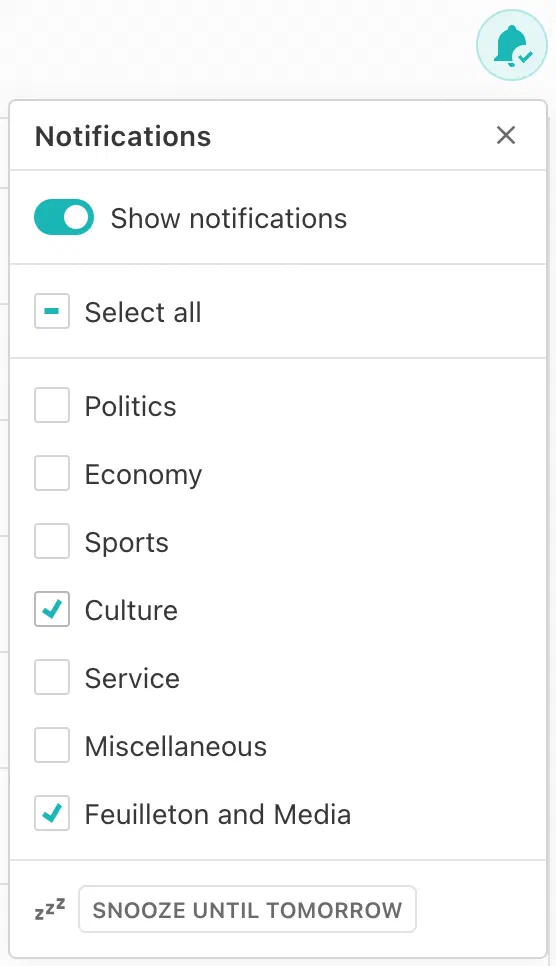
Notifications are triggered only if all of the following conditions are met:
- Notifications are enabled and the sleep timer is deactivated.
- The report matches the selected categories.
- The report has Priority 1 or Priority 2.
Each notification remains visible until the user closes it, creates an article from it, or 30 minutes have elapsed, after which it is closed automatically.


