---
title: Video Includes
description: Embed videos with a custom player and externally transcoded assets
---
Video includes are based on [Includes](/reference/document/includes/llms.txt) and provide a more flexible approach to embedding videos within a document than using the standard media library entry directly. The media library approach does not have an integrated solution for video transcoding, so it would only be possible to render the original video file to HTML. On the other hand, using an include service allows you to hook into an external service or data store which could provide the transcoded assets you require.
## Example
### Include service
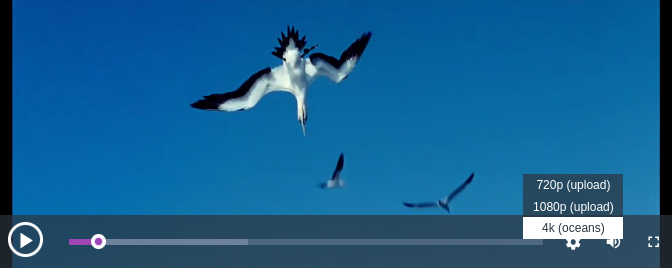
The example include service below uses [Video.js](https://videojs.com/) as the player to provide additional functionality on top of the default browser video player. In this instance it has been extended with the [@silvermine/videojs-quality-selector](https://www.npmjs.com/package/@silvermine/videojs-quality-selector) plugin which allows the user to pick from predefined video resolutions. The `getTranscodedAssets()` function should be used to query an external service and return the transcoded video assets.
#### Screenshot
#### Code
```js
// includes/video.js
const {nanoid} = require('nanoid')
function getAspectRatio({width, height}) {
// Calculate the height as a percentage of the width, to one decimal place
return Math.round((height / width) * 1000) / 10
}
// This async function should make a call to an external service for additional assets
async function getTranscodedAssets({asset}) {
return [
{
url: asset.url,
mimeType: asset.mimeType,
aspectRatio: getAspectRatio(asset),
label: '720p (Upload)' // Resolution is not accurate
},
{
url: `${asset.url}?preset=1080p`,
mimeType: asset.mimeType,
aspectRatio: getAspectRatio(asset),
label: '1080p (Upload)', // Resolution is not accurate
selected: true // Default source
},
{
// Another file for testing purposes
url: 'https://vjs.zencdn.net/v/oceans.mp4',
mimeType: 'video/mp4',
aspectRatio: getAspectRatio(asset),
label: '4k (Oceans)'
}
]
}
module.exports = function ({liServer, framework}) {
const documentsConfig = liServer.features.config('li-documents')
const imageService = framework.imageServices.get(documentsConfig.selectedImageService)
return {
name: 'video-service',
paramsSchema: [
{
handle: 'video-param',
type: 'li-video-reference',
// Preloading is only neccessary if you need the asset or some metadata,
// otherwise you can use the reference id to load more data.
preload: true,
ui: {
config: {
posterImageUploadMediaType: 'poster-image'
}
}
}
],
blockEditorInteraction: 'initial',
rendering: {
type: 'function',
async render(params, context) {
// value and posterImageValue are the preloaded media library entries
const {reference, value, posterImageValue} = params['video-param'] || {}
// Display the component placeholder in the editor
if (!reference?.id && context.preview) return {doNotRender: true}
// Render an empty container - this could also be another placeholder or error message
if (!value) return {content: []}
const posterImageUrl = posterImageValue
? imageService.getUrl(posterImageValue.asset.url)
: value.metadata.posterImage?.url || ''
const transcodedAssets = await getTranscodedAssets(value)
const randomId = `video-include-${nanoid()}`
const videoJsSetup = {
// Assuming that all video qualities use the same aspect ratio
aspectRatio: `1000:${transcodedAssets[0].aspectRatio * 10}`,
controlBar: {
qualitySelector: true,
volumePanel: {
inline: false
}
}
}
return {
html: `
${transcodedAssets
.map(
(asset) => `
`
)
.join('')}
Loading...
`,
dependencies: {
js: [
{
namespace: 'includes.video',
src: 'https://unpkg.com/video.js@7.17.0/dist/video.js'
},
{
namespace: 'includes.video',
src: 'https://unpkg.com/@silvermine/videojs-quality-selector@1.2.5/dist/js/silvermine-videojs-quality-selector.min.js'
},
{
// This inline JS will be loaded for each component to initialise Video.js
namespace: 'includes.video',
code: `videojs(${JSON.stringify(randomId)}, ${JSON.stringify(videoJsSetup)})`
}
],
css: [
{
namespace: 'includes.video',
src: 'https://unpkg.com/video.js@7.17.0/dist/video-js.css'
},
{
namespace: 'includes.video',
src: 'https://unpkg.com/@videojs/themes@1.0.1/dist/fantasy/index.css'
},
{
namespace: 'includes.video',
src: 'https://unpkg.com/@silvermine/videojs-quality-selector@1.2.5/dist/css/quality-selector.css'
},
{
// This inline CSS will be shared between all video includes (loaded once),
// but it could also be defined in the design CSS.
namespace: 'includes.video',
code: `
.video-include-vjs .status-container {
position: relative;
padding-top: 56.25%;
background-color: #000;
color: #fff;
}
.video-include-vjs .status-container--empty {
background-color: #333;
}
.video-include-vjs .status-content {
position: absolute;
top: 0;
bottom: 0;
left: 0;
right: 0;
display: flex;
align-items: center;
justify-content: center;
}
`
},
{
// This inline CSS will be loaded for each component and set the aspect ratio
namespace: 'includes.video',
code: `
#${randomId} .status-container {
padding-top: ${transcodedAssets[0].aspectRatio}%;
}
`
}
]
}
}
}
}
}
}
```
### Component
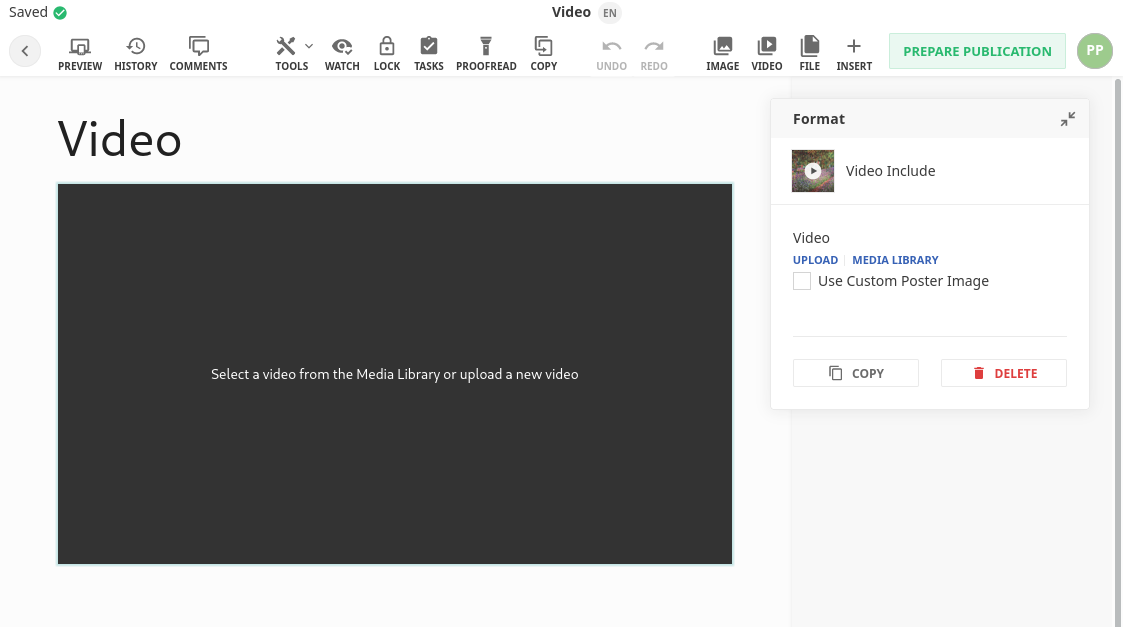
This is a simple component which uses an include directive to render with the video-service defined above. So that there is not a major shift in content positions when a video is selected it uses a placeholder which has 100% width and is in a 16:9 ratio. The inline styles could be moved into the design CSS and then shared with the include service above.
#### Screenshot
#### Code
```js
// components/video.js
module.exports = {
name: 'video-include',
label: 'Video',
iconUrl: `https://livingdocsio.github.io/livingdocs-design-assets/docs/icons/component-icons/icon_component_video.svg`,
directives: [
{
name: 'video-directive',
type: 'include',
service: 'video-service'
}
],
html: `
Select a video from the Media Library or upload a new video