To get an overview about new functionality, read the Release Notes.
To learn about the necessary actions to update Livingdocs to release-2026-01, read on.
Attention: If you skipped one or more releases, please also check the release-notes of the skipped ones.
Webinar
- Feature Webinar Recording | Passcode:
+.W7Sq5T - Feature Webinar Slides
- Developer Webinar Recording | Passcode:
9D&h@J#J - Developer Webinar Slides
- Release Newsletter Subscription
System Requirements
Suggested
| Name | Version |
|---|---|
| Node | 24 |
| NPM | 11 |
| Postgres | 18 |
| Elasticsearch | 9.x |
| OpenSearch | 2.3.0 |
| Redis | 8 |
| Livingdocs Server Docker Image | livingdocs/server-base:24 |
| Livingdocs Editor Docker Image | livingdocs/editor-base:24 |
| Browser Support | Chrome >= 143, Edge >= 143, Firefox >= 146, Safari >= 26.2 |
Minimal
| Name | Version |
|---|---|
| Node | 22.17.1 |
| NPM | 10 |
| Postgres | 14 |
| Elasticsearch | 7.x |
| OpenSearch | 1 |
| Redis | 6.2 |
| Livingdocs Server Docker Image | livingdocs/server-base:22 |
| Livingdocs Editor Docker Image | livingdocs/editor-base:22 |
| Browser Support | Chrome >= 131, Edge >= 131, Firefox >= 133, Safari >= 18.2 |
Deployment
Before the deployment
No pre-deployment steps are required before rolling out this release.
Rollout deployment
Migrate the Postgres Database
No migrations are required for this release.
After the deployment
Run the one-time script livingdocs-server release-2026-01-set-flag-for-revoked-media-with-deleted-assets. This script should run quite quickly as it only processes revoked media library entries. It loops through the entries and checks whether the asset still exists in storage. If the asset has been deleted (which was the old behaviour) it sets a state property which is used to prevent the media library entry from being restored (unrevoked). It’s important to do this now, even if you have not set use2025Behavior: true in the server config, because without running it users will be able to restore entries which no longer have assets and will therefore display broken images. For future revoke events the flag will automatically be set to the correct value from this release onwards.
Rollback
No rollback steps are required for this release.
Breaking Changes 🔥
Drop support for Node v20 🔥
Node versions below 22.17.1 are no longer supported. Node 20 will stop being maintained on 30 April 2026. Please upgrade to at least the latest versions of livingdocs/server-base:22 and livingdocs/editor-base:22, or preferably to livingdocs/server-base:24 and livingdocs/editor-base:24.
Drop support for Postgres v13 🔥
Postgres versions below 14 are no longer supported. Postgres 13 stopped being maintained on 13 November 2025. Please upgrade to at least Postgres 14, or preferably to Postgres 18.
Stricter Validation for Documents Imported via the Public API 🔥
Documents imported via the Public API were previously validated too loosely, allowing imports with incorrect content structures. This could cause issues later when editing these documents in the Livingdocs Editor, where content validation is more strict.
Importing documents with an invalid content schema via the Public API is no longer possible and will now result in a failed import.
Revoke State Conflict Errors 🔥
Revoking an already revoked media library entry will now throw a ConflictError, and return a 409 status for requests. Throwing an error is important to preserve the exising revoke note. It also matches the new unrevoke behaviour where calling unrevoke on an entry which is not revoked will throw an error.
Publish Control Restrictions When Print Mode Is Enabled 🔥
The project config properties contentTypes[].publishControl.publishSchedule,
contentTypes[].publishControl.unpublishSchedule,
contentTypes[].publishControl.significantPublicationDate, and
contentTypes[].publishControl.resetVisiblePublicationDateOverrideOnSignificantUpdate
are no longer supported when contentTypes[].print is enabled.
These settings were already partially unsupported in the Livingdocs Editor. We’re now enforcing the same behavior in the Livingdocs Server as well.
Validation of Delivery References 🔥
Deliveries referenced by project config property contentTypes[].deliveries[].deliveryName are now validated. If a delivery reference is invalid, an error will be thrown. Make sure the referenced deliveries exist.
Project Config Schema Changes for Media Library 🔥
The two following properties have been removed from the project config schema:
projectConfig.editorSettings.mediaLibrary.dashboardprojectConfig.editorSettings.mediaLibrary.editorSelection
These properties were used to define display filters, but they have not been used since 2021. If they still exist please remove them before upgrading to release-2026-01 to avoid project config validation errors.
Internal Reference Functions Return Objects 🔥
The following internal API methods return an object {results: [], total: 0, cursor: ''} instead of an array:
documentApi.findIncomingReferences()publicationApi.findIncomingReferences()mediaLibraryApi.findIncomingReferences()
Modify any custom code using the functions listed above to use the results property of the returned object.
Remove Project Builders API 🔥
The Project Builders API liServer.features.api('li-project-builders') has been removed, along with the projectBuilders server config property.
Alongside this, two Registration API functions have been removed: createUserWithProjectBuilders and createSSOUserWithProjectBuilders.
Deprecations ⌛
Referenced Designs ⌛
Referenced designs are now deprecated and will be removed in release-2026-07. Please use embedded designs instead.
Declarative Document Copy API ⌛
The Declarative Document Copy API (which uses the settings.copy object in the project config) has been deprecated and will be removed in release-2026-07.
Please use Document Copy Flows and Document Transform Flows instead:
- https://docs.livingdocs.io/guides/editor/document-copy-flows
- https://docs.livingdocs.io/guides/editor/document-transform-flows
Search Metadata Mapping ⌛
The search.metadataMapping server config property is deprecated and will be removed in release-2026-07. Please use dynamic metadata mapping instead.
The relevant li-* core plugins have indexing enabled, but you might need to add an indexing config to custom metadata plugins:
{
  name: 'my-slug',

  indexing: {
    enabled: true,
    behavior: [
      {type: 'text'},
      {
        type: 'keyword',
        getValue(val) {
          if (val.length > 100) return val.substr(0, 100)
          return val
        }
      }
    ]
  },

  storageSchema: {
    type: 'string'
  }
}
In the content type config or media type config you will also need to set config.index: true:
{
  handle: 'slug',
  type: 'my-slug',
  config: {
    index: true
  }
}
More details can be found in the documentation:
- Enable indexing on metadata plugin
- Publication Index > Metadata Plugins
- Create your own Metadata Plugin
Deprecate various search schema properties ⌛
The following server config properties are deprecated and will be removed in release-2026-07:
search.queryBuilderConfigsearch.implementationVersionsearch.reindexBatchSizesearch.reindexDelaysearch.reindexConcurrencysearch.fieldssearch.gaussScalesearch.gaussDecaysearch.gaussOffsetsearch.gaussWeightsearch.prefixQueryTypesearch.prefixQueryFieldssearch.fulltextQueryTypesearch.fulltextQueryOperator
Print Mode and huGO Print Preview ⌛
The huGO Print Preview, and the acompanying “Print Mode” in the Livingdocs editor, are deprecated and will be removed in release-2026-07.
The following config properties should be removed before release-2026-07 as they will no longer have any effect after that point:
projectConfig.settings.editModecontentTypeConfig.print.enabledcontentTypeConfig.print.enableStepZoomingeditorConfig.app.editable.print
Support for contentTypeConfig.print.componentMap will remain because it is still used when exporting documents to huGO.
Once editMode: 'print' is removed there will be a few UI elements that will no longer be available. The main one is the huGO Print Preview, which should be replace with a custom preview function. The create dialog for print articles will also be removed which can be replaced with a document creation flow if required. There is also a print section at the top of the metadata form which can be replaced using metadata plugins and metadata groups.
Publish Type ⌛
Project config properties deliveries[].publishType and contentTypes[].publishType have been deprecated and will be removed in release-2026-07. Please migrate to the newly introduced Publish Control Export Mode instead.
Google Vision Integration ⌛
The Google Vision integration is deprecated and will be removed in release-2026-07. This includes the li-google-vision metadata plugin. We do not expect that any customer is using this, but if you are then please contact us and we will provide support for the migration.
Features 🎁
Publish Control Export Mode 🎁
Publish control export mode is a new way to export documents from Livingdocs to external systems. It is meant for publishers who use Livingdocs not only for websites but also for print products, digital editions, or newsletters.
In the past, editors had to publish a document first and then trigger an export separately. For some content types this was inconvenient.
With export mode, editors can now export a document with a single button click. This makes it easier to produce print articles and newsletters from the Livingdocs editor.
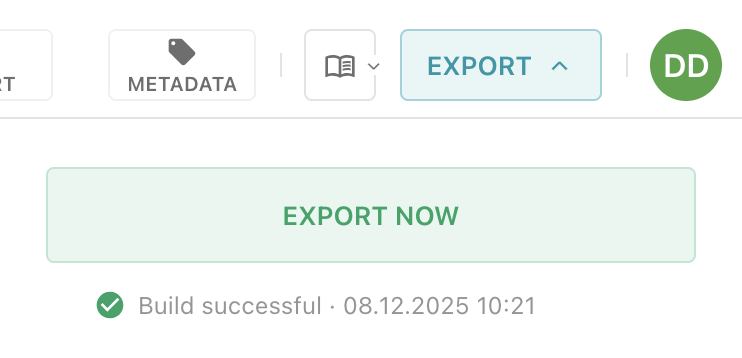
Under the hood, export mode combines existing concepts such as publishing and delivery builds. For instructions and more details, refer to the Publish Control Export Mode guide.
Media Library Dashboards 🎁
We’ve noticed that many customers model their Livingdocs navigation around internal organizational structures to reflect their workflows. However, the Media Library screens for images, videos, and files were constrained to a single configuration and could appear only once in the navigation. To enable the Media Center to evolve into a fully integrated DAM system, we are introducing Media Library Dashboards.
Customers can now create an unlimited number of Media Libraries. These are configured in the same way as other custom dashboards. Base Filters, Display Filters, and a reference to an existing Card Configuration are now defined centrally, rather than on the media type.
How to configure a Media Library Dashboard to be available in the main navigation?
First, create a new Media Library Dashboard. You can find detailed instructions in the Media Library Dashboard Configuration guide. Next, add the dashboard to the dashboards array in the editorSettings.
Once this is done, the dashboard can be referenced in the mainNavigation to make it visible.
Note that, previously, adding an entry with liItem: 'mediaLibrary' to the mainNavigation would display the preconfigured (legacy) Media Library.
If at least one Media Library Dashboard is configured, this navigation entry will be ignored.
When opening a Media Library Dashboard from the main navigation, and multiple mediaTypes are available, a dialog will prompt the user to select the desired media type.
How to configure a specific Media Library Dashboard for the document editor?
To define which Media Library Dashboard is available in the document editor—either in the side panel or in a modal dialog, you can reference its handle in the content type configuration for images, videos, or files using useDashboard.
Learn how to configure this setting here.
If nothing is referenced, it will fallback to the old setup, where baseFilters, displayFilters and card-configuration are based on mediaTypes. This fallback behavior is planned for deprecation.
Extended Revoke Behaviour 🎁
Unrevoke
A new unrevoke action has been added which can be used to revert a revoke action. This can be useful when a legal case has been resolved and the use of the asset is allowed again.
The unrevoke action can be performed in the Livingdocs UI on the media library entry page. This is only available with the media library’s 2025 Behavior.
It’s also possible to patch a media library entry in the code:
publicApi.patchMediaLibraryEntry({
  userId,
  projectId,
  assetId,
  patches: [{operation: 'unrevokeAsset'}],
  version
})
or using the Public API endpoint:
PATCH /api/:apiVersion/mediaLibrary/:id {patches: [{operation: 'unrevokeAsset'}]}
 Please see the After the deployment step to ensure that revoke states are set correctly and this functionality behaves as expected.
Revoke Note
The revoke action has been extended with a note property. note is a string which has a maximum length of 200 characters.
The revoke note can be added in the Livingdocs UI on the media library entry page. An optional input field appears after clicking the revoke button. This is only available with the media library’s 2025 Behavior.
It’s also possible to patch a media library entry in the code:
publicApi.patchMediaLibraryEntry({
  userId,
  projectId,
  assetId,
  patches: [{operation: 'revokeAsset', note: 'Case #1'}],
  version
})
or using the Public API endpoint:
PATCH /api/:apiVersion/mediaLibrary/:id {patches: [{operation: 'revokeAsset', note: 'Case #1'}]}
Public API Return Values 🎁
Starting with /api/2026-01/* the Public API endpoints which previously returned an array now return an object containing a results property with this array. There can also be a total number of results and a cursor for pagination depending on whether or not the endpoint supports it. To improve the accuracy of the pagination the cursor can be passed back to the endpoints or functions using the after parameter, for example: /api/2026-01/publications/search?filters=${filters}&limit=10&after=${cursor}.
The following endpoints return {results: [], total: 0, cursor: ''}:
GET /api/2026-01/publications/searchGET /api/2026-01/documents/:documentId/incomingDocumentReferencesGET /api/2026-01/documents/:documentId/incomingMediaReferencesGET /api/2026-01/mediaLibrary/:mediaId/incomingDocumentReferencesGET /api/2026-01/mediaLibrary/:mediaId/incomingMediaReferencesGET /api/2026-01/drafts/:documentId/incomingDocumentReferences
The following endpoints return {results: []}:
GET /api/2026-01/documents/latestPublicationsGET /api/2026-01/publicationEvents{/:channelHandle}GET /api/2026-01/document-listsGET /api/2026-01/categoriesGET /api/2026-01/mediaLibraryPOST /api/2026-01/import/mediaLibrary
To achieve the same effect when working directly with the Public API feature in downstream code you can pass apiVersion: '2026-01' (or greater once supported) within the main parameter object, for example: publicApi.searchPublications({projectId, filters, apiVersion: '2026-01'}).
The following methods return {results: [], total: 0, cursor: ''}:
publicApi.searchPublications()publicApi.getIncomingPublicationReferencesForDocument()publicApi.getIncomingMediaReferencesForDocument()publicApi.getIncomingPublicationReferencesForMedia()publicApi.getIncomingMediaReferencesForMedia()publicApi.getIncomingDocumentReferencesForDraft()
The following methods return {results: []}:
publicApi.getLatestDraftsBeta()publicApi.getLatestPublications()publicApi.getPublicationEvents()publicApi.findDocumentLists()publicApi.getCategories()publicApi.getMediaLibraryEntries()publicApi.createMediaLibraryEntries()
To continue to return the array directly you can still use the /api/2025-11/* (or earlier) endpoints, or omit the apiVersion when calling the methods.
Default Media Types 🎁
Instead of always defaulting to the media types with the handles ‘image’, ‘video’ and ‘file’ it is now possible to configure different media types to use on a project and content type level. These media types will be used when uploading media using the upload functionality in the document side panel and metadata form, or when dragging and dropping images into a document.
Project config:
{
  v: 2,
  // ...
  settings: {
    handle: 'my-project',
    // ...
    defaultMediaTypes: {
      mediaImage: 'image',
      mediaVideo: 'video',
      mediaFile: 'file'
    }
  }
}
Content type config:
{
  handle: 'data-visualisation',
  documentType: 'article',
  // ...
  defaultMediaTypes: {
    mediaImage: 'infographic',
    // mediaVideo: 'video',
    // mediaFile: 'file'
  }
}
The ‘image’, ‘video’ and ‘file’ media types are still the defaults, so you do not need to configure anything to keep the existing behaviour.
Display li-tree Properties Initially Collapsed 🎁
The li-tree metadata plugin has a new configuration option: treeInitiallyCollapsed. When enabled, the tree property is displayed in a collapsed state by default. This is especially beneficial for very large tree structures, where the high number of DOM elements can cause browsers to slow down or freeze. For such scenarios, we recommend enabling this option.
{
  handle: 'myContentType',
  metadata: [
    {
      handle: 'myMetadataProperty'
      type: 'li-tree',
      config: {},
      ui: {
        config: {
          treeInitiallyCollapsed: true
        }
      }
    }
  ]
}
Vulnerability Patches
We are constantly patching module vulnerabilities for the Livingdocs Server and Livingdocs Editor as module fixes are available. Below is a list of all patched vulnerabilities included in the release.
Livingdocs Server
This release we have patched the following vulnerabilities in the Livingdocs Server:
- CVE-2025-64718 patched in
js-yamlv4.1.1 - CVE-2025-65945 patched in
jwsv3.2.3 and v4.0.1
No known vulnerabilities. 🎉
Livingdocs Editor
This release we have patched the following vulnerabilities in the Livingdocs Editor:
- No vulnerabilities were patched in this release.
We are aware of the following vulnerabilities in the Livingdocs Editor:
- CVE-2023-44270 vulnerability in
postcss, it affects linters using PostCSS to parse external Cascading Style Sheets (CSS). It is not exploitable in the editor as we don’t load untrusted external CSS at build time. - CVE-2022-25844, CVE-2022-25869, CVE-2023-26116, CVE-2023-26117, CVE-2023-26118, CVE-2024-8372, CVE-2024-8373, CVE-2024-21490, CVE-2025-0716 are all AngularJS vulnerabilities that don’t have a patch available. We are working on removing all AngularJS from our code and vulnerabilities will go away when we complete the transition to Vue.js.
- CVE-2024-9506 vulnerability in
vue, an ReDoS vulnerability exploitable through inefficient regex evaluation in parseHTML function. The issue can cause excessive CPU usage but is not exploitable in the editor as we don’t load untrusted HTML at runtime.
Patches
Here is a list of all patches after the release has been announced.
Livingdocs Server Patches
v294.0.18: fix: do not expose maxDimension if use2025Behavior is enabled
v294.0.17: fix(deps): update dependency file-type from 21.3.0 to 21.3.2 [security]
v294.0.16: fix(images): Allow gif uploads with 1800 frames
v294.0.15: fix(deps): update dependency @livingdocs/framework from 32.11.5 to v32.11.7
v294.0.14: fix(dep): Update dependencies
v294.0.13: fix(deps): update dependency @livingdocs/framework from 32.11.4 to v32.11.5
v294.0.12: fix(hugo): support extracting title from imported picture
v294.0.11: chore: Upgrade to ajv@8.18.0
v294.0.10: fix: bump file-type version for a bug fix
v294.0.9: fix: read mimetype from asset object
v294.0.8: fix(deps): update dependency @livingdocs/framework from 32.11.3 to v32.11.4
v294.0.7: fix(media-library): Only support revoke note with use2025Behavior
v294.0.6: fix: allow removing settings.editMode
v294.0.5: fix(print): Limit LIDEP075 deprecation to specific properties
v294.0.4: fix(retresco): show projectId in error message if integration is disabled
v294.0.3: fix: keep animation when downloading image
v294.0.2: fix(deps): update dependency @livingdocs/framework from 32.11.2 to v32.11.3
v294.0.1: fix(release-2026-01): Update framework to v32.11.2 (release-2026-01 tag)
Livingdocs Editor Patches
v123.3.40: fix(editor): Remove unused scrollPosition property
v123.3.39: fix(tests): Clear localStorage to prevent cross-test contamination
v123.3.38: fix(deps): Update vulnerable dependencies
v123.3.37: fix(assistants): Fix image proposals in assistants
v123.3.36: fix: request confirmation before archiving a group
v123.3.35: fix(deps): update dependency fastify from 5.7.3 to 5.8.1 [security]
v123.3.34: fix: add scroll offset
v123.3.33: fix(images): Allow gif uploads with 1800 frames
v123.3.32: fix(tasks): Sort completed tasks by completed date
v123.3.31: fix(task-boards): take total results from request
v123.3.30: fix(search): Limit query length and display understandable error
v123.3.29: fix(metadata): Fix undefined property error in user needs form
v123.3.28: refactor(multiselect-navigation): improve naming of function useMultiSelectSelection
v123.3.27: fix(deps): update dependency @livingdocs/framework from 32.11.5 to v32.11.7
v123.3.26: fix(metadata): Reset additional language after translation deletion
v123.3.25: fix(deps): update dependency @livingdocs/framework from 32.11.4 to v32.11.5
v123.3.24: chore: Remove code-highlight angular component
v123.3.23: fix: configure ttl cache of media library dataloader
v123.3.22: fix(deps): update dependency axios from 1.13.2 to 1.13.5 [security]
v123.3.21: fix: Reintroduce accidentally removed
editorvariable on properties panel controller to fix legacy embedsv123.3.20: refactor(include): reduce complexity of the debouncing bursts
v123.3.19: fix(lightbox): reset locale on close
v123.3.18: fix: review feedback
v123.3.17: fix: update framework
v123.3.16: fix(print-flow): Disable create button when workspace is dirty
v123.3.15: fix: set an unpublish schedule for a scheduled document
v123.3.14: fix: clear include overrides when replacing a teaser via drag&drop
v123.3.13: fix: render li-image metadata properties with namedCrops in media upload
v123.3.12: fix: show tooltips on text formatting toolbar buttons
v123.3.11: fix(server-admin): Cache grouped documents to prevent infinite digest
v123.3.10: fix: show display filters in media library sidepanel
v123.3.9: chore(dashboards): Make cacheKey prop required for LiDocumentResults
v123.3.8: fix: do not attempt to render comments in history view
v123.3.7: chore(config): Prevent duplicate keys error from keyboardShortcuts
v123.3.6: fix: restore row highlight
v123.3.5: fix: loosen delivery build prop validation
v123.3.4: fix: remove outdated comment
v123.3.3: fix(deps): update dependency @livingdocs/framework from 32.11.2 to v32.11.3
v123.3.2: refactor(media-dashboards): use asset type labels for default pageTitle on the media-library
v123.3.1: fix(release-2026-01): Update framework to v32.11.2 (release-2026-01 tag)
Icon Legend
- Breaking changes: 🔥
- Feature: 🎁


