To get an overview about new functionality, read the Release Notes.
To learn about the necessary actions to update Livingdocs to release-2026-03, read on.
Attention: If you skipped one or more releases, please also check the release-notes of the skipped ones.
Webinar
- Feature Webinar Recording | Passcode:
$eNi^5B@ - Feature Webinar Slides
- Developer Webinar Recording | Passcode:
3$aJ&ztx - Developer Webinar Slides
- Release Newsletter Subscription
System Requirements
Suggested
| Name | Version |
|---|---|
| Node | 24 |
| NPM | 11 |
| Postgres | 17 |
| Elasticsearch | 9 |
| OpenSearch | 3 |
| Redis | 8 |
| Valkey | 9 |
| Livingdocs Server Docker Image | livingdocs/server-base:24 |
| Livingdocs Editor Docker Image | livingdocs/editor-base:24 |
| Browser Support | Chrome >= 145, Edge >= 145, Firefox >= 148, Safari >= 26.3 |
Minimal
| Name | Version |
|---|---|
| Node | 22.17.1 |
| NPM | 10 |
| Postgres | 14 |
| Elasticsearch | 8 |
| OpenSearch | 2 |
| Redis | 6.2 |
| Valkey | 7 |
| Livingdocs Server Docker Image | livingdocs/server-base:22 |
| Livingdocs Editor Docker Image | livingdocs/editor-base:22 |
| Browser Support | Chrome >= 133, Edge >= 133, Firefox >= 135, Safari >= 18.3 |
Deployment
Before the deployment
No pre-deployment steps are required before rolling out this release.
Rollout deployment
Migrate the Postgres Database
When upgrading, first run the database migrations. At Livingdocs, we run this command in an initContainer on Kubernetes.
All migrations should execute quickly and not lock write-heavy tables.
# 216-image-variants.js
#   Creates the `media_library_entries_image_variants` table for image editing
#   in documents.
livingdocs-server migrate up
After the deployment
Migrate image editing to documents
Image editing in documents moves color adjustments from media library entries to individual document occurrences. A one-time migration script is available to apply this change to existing modifications.
Run the following migration script if use2025Behavior is enabled and disableImageEditingInDocuments is not:
npx livingdocs-server release-2026-03-image-editing-in-documents
This migrates image modifications (brightness, contrast, saturation) from media library entries to their respective image occurrences in documents. Without it, images can still be edited, but existing modifications remain applied globally on media library entries rather than locally per document occurrence.
This migration is not reversible. Run it only once you are confident you won’t switch back to the old behavior. If disableImageEditingInDocuments is currently enabled, run this script once you disable it.
Fix rotated image dimensions
A bug stored wrong dimensions for rotated images (EXIF orientation 5–8) when use2025Behavior was enabled. A one-time script loads the asset from storage, checks the dimensions, and corrects them in the database if they are wrong.
Run the following script if use2025Behavior is enabled:
npx livingdocs-server release-2026-03-fix-rotated-image-dimensions --yes
Optional flags:
--since(-s): Only check entries updated on or after this date, when the bug was introduced (default:2025-03-01)--delay(-d): Delay in ms between entries to reduce database pressure (default:50)
Rollback
No rollback steps are required for this release.
Breaking Changes 🔥
Drop Support for Elasticsearch 7 and OpenSearch 1 🔥
Elasticsearch 7 and OpenSearch 1 are no longer maintained and therefore no longer supported by Livingdocs.
Please upgrade to at least the new minimum versions:
- Elasticsearch 8
- OpenSearch 2
Or preferably to our recommended versions:
- Elasticsearch 9
- OpenSearch 3
Reserved v/ Key Prefix for Image Editing in Documents 🔥
Image variant keys use the v/ prefix (e.g. v/2026/02/10/abc123). If you have configured a custom storage.computeKey function for image storage, ensure it does not return keys starting with v/.
Validation of Media Source Plugin Return Properties systemName and externalId 🔥
The media source plugin function searchMediaImage now requires systemName and externalId to be strings when returned. Previously, these properties were not validated and had no effect.
Deprecations
Removing Angular
We’ve decided to remove more angular-specific examples in our documentation. We’ve also acquired a TuxCare Long Term Support License to ensure that Livingdocs is not affected by the known Vue.js & Angular vulnerabilities.
To update to the release-2026-03, an npm access token requires permissions against those private modules:@livingdocs/angular, @livingdocs/editor, @livingdocs/framework, @livingdocs/pintura, @livingdocs/server, @livingdocs/vue, @livingdocs/vue-demi, @livingdocs/vue-pintura, @livingdocs/vue-template-compiler
Deprecate Custom doc-html Embeds
The registerCustomEmbeds function is deprecated and will be removed in release-2026-09.
Deprecate iframe Plugins
The liEditor.registerIframePlugin function is deprecated and will be removed in release-2026-09.
Deprecate Old Push-Notification Feature
The metadata plugin li-push-notifications is deprecated and will be removed in release-2026-09.
Please use the li-push-messages metadata plugin instead.
Deprecate Metadata Hooks
The metadata plugin hooks onUpdate, onPreparePublish, onUnpublish, onRender are deprecated and will be removed in release-2026-09.
The plugin hooks often caused issues or confusion with order of execution and resulted in complex logic in customer setups. With the standardization strategy we’re following, there haven’t been any needs anymore for those as there are alternatives.
Please use the registerPublicationHooks.
Deprecate mediaLibrary.disableImageEditingInDocuments
The mediaLibrary.disableImageEditingInDocuments server configuration option is deprecated and will be removed in release-2026-09. It is introduced alongside image editing in documents as a temporary opt-out.
Features 🎁
Usage Log 🎁
Customers need to keep track of where and when an image was published for legal reasons and royalty billing. This could be a web article, a print product, a social media post, or a digital edition. Some usages can be directly inferred from their presence in a published Livingdocs document. For publications outside of Livingdocs, usage needs to be tracked separately.
To learn how to setup the Usage Log feature please see the Usage Log section of the Media Library guide.
Image Editing in Documents 🎁
Images can now be edited directly within a document. An “Adjust” button on each image placement lets users rotate images and apply colour adjustments (brightness, contrast, saturation) per placement, without affecting the original image or other documents that reference it.
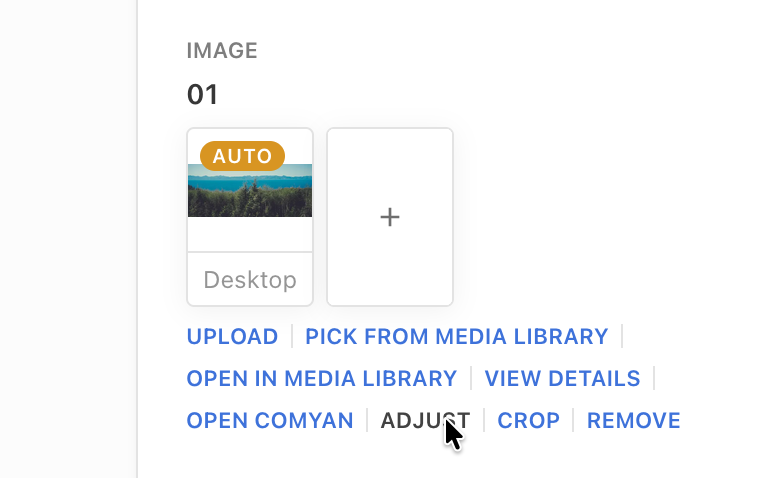
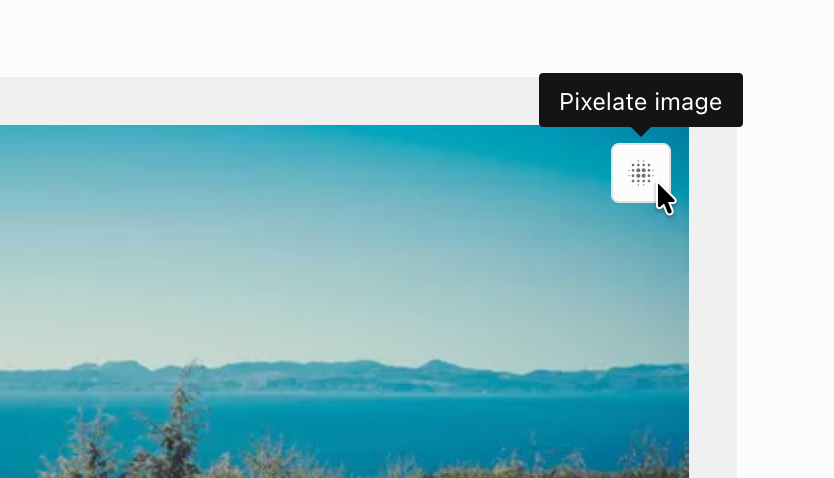
As a result, colour adjustments are no longer available in the media library. The only image modification that remains in the media library is pixelation. Pixelation continues to be applied globally to all image placements.
The new behavior is enabled automatically for all setups that have use2025Behavior: true. Once enabled, reverting to the previous behavior is not supported. A one-time migration script is available to migrate existing image modifications from media library entries to their respective document occurrences.
If newsrooms need time to adapt, image editing in documents can be temporarily disabled using mediaLibrary.disableImageEditingInDocuments. Note that this option is deprecated and will be removed in release-2026-09. This option must be set before users start editing images in documents. Disabling it afterwards will not remove existing variants, which will continue to be applied in their respective placements.
This change is non-breaking for deliveries. Images can continue to be fetched by key as before. However, since an image can now have multiple variants, ensure you use mediaLibraryApi.getAllKeysForMediaLibraryEntry() when purging CDN caches after a media library entry is revoked or invalidated, as it returns all associated keys including any variant keys.
See Image Editing in Documents for details.
Image Rotation 🎁
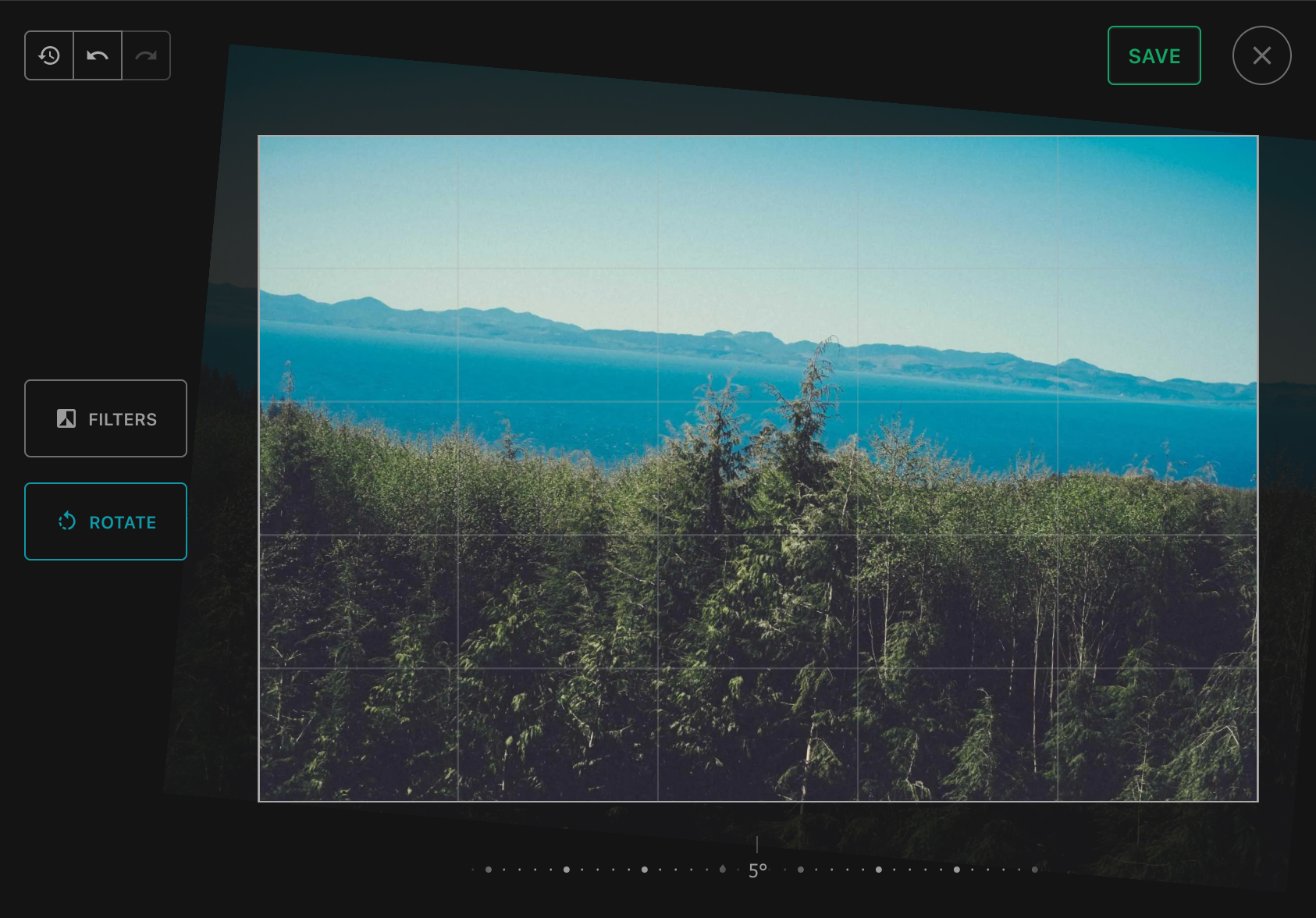
Journalists can now rotate images directly within a document. This is particularly useful for correcting a skewed horizon. Rotation is applied per placement, so the original image and any other documents that reference it remain unchanged. Since rotating an image changes its dimensions, any existing crops on that placement are reset automatically.
Media Library Thumbnail Sizes 🎁
When working with image agency feeds, users often need to visually scan through large volumes of images, for example to pick relevant photos from a live coverage event or to identify the start and end of a photo series.
The thumbnail size on Media Library Dashboard screens can now be adjusted between small (S), medium (M) and large (L). The dashboard also uses the full available screen width and scrolling through results works like infinite scrolling without interruptions.
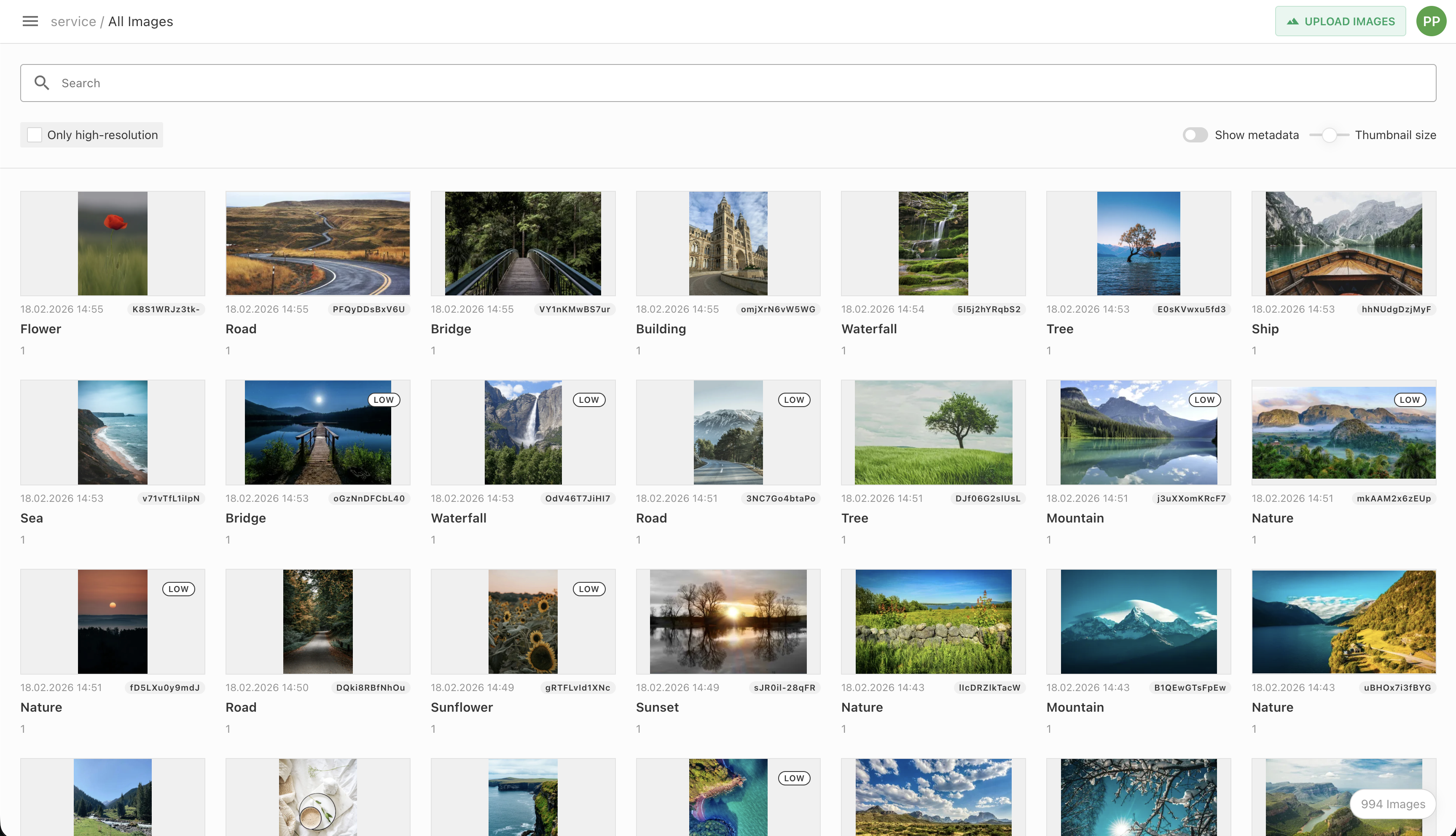
For more details, refer to the Media Library Thumbnail Sizes guide.
Preserve Timestamps on Document Command API and Media Library Patch 🎁
A new optional preserveUpdatedAt boolean parameter has been added to the Document Command API and the Media Library patch endpoint.
When set to true, the updated_at timestamp of the document or media library entry is not modified by the operation. By default (false), updated_at is set to the current time as before.
For the Document Command API, when combined with a publish command, the lastPublicationDate will also be set to the preserved updated_at timestamp instead of the current time.
This is useful for imports and migrations where the original timestamps should be preserved to maintain correct dashboard sort order.
Using the Document Command API:
publicApi.executeDocumentCommands({
  userId,
  projectId,
  documentId,
  preserveUpdatedAt: true,
  commands: [{operation: 'setMetadataProperty', propertyName: 'title', value: 'updated title'}]
})
or using the Public API endpoint:
PATCH /api/:apiVersion/documents/{documentId}/commands {preserveUpdatedAt: true, commands: [...]}
Using the Media Library Patch API:
publicApi.patchMediaLibraryEntry({
  userId,
  projectId,
  assetId,
  preserveUpdatedAt: true,
  patches: [{operation: 'setMetadataProperty', propertyName: 'title', value: 'updated title'}]
})
or using the Public API endpoint:
PATCH /api/:apiVersion/mediaLibrary/{id} {preserveUpdatedAt: true, patches: [...]}
Reuse Already Imported Media Source Items 🎁
When a media source item has already been imported, Livingdocs now reuses the existing media library entry instead of importing it again. This allows keeping media libraries free of duplicates when using media from external systems.
To enable the deduplication, media source search results can include systemName and externalId. If a media library entry with the same systemName/externalId pair already exists, it is reused.
module.exports = {
  handle: 'examplePlugin',
  async searchMediaImage() {
    return {
      total: 123,
      results: [
        {
          metadata: {},
          asset: {},
+         systemName: 'exampleSource',
+         externalId: 'exampleExternalId'
        }
      ]
    }
  },
  async fetchMediaImage() {}
}
Official Valkey Support 🎁
Valkey is now officially supported as a drop-in alternative to Redis. Valkey 7 and 9 are included in our test pipeline. The minimum supported version is Valkey 7, and the recommended version is Valkey 9.
To use Valkey, point the existing Redis configuration in the server config to your Valkey instance. No other changes are required.
Vulnerability Patches
We are constantly patching module vulnerabilities for the Livingdocs Server and Livingdocs Editor as module fixes are available. Below is a list of all patched vulnerabilities included in the release.
Livingdocs Server
This release we have patched the following vulnerabilities in the Livingdocs Server:
- CVE-2026-3419 / GHSA-573f-x89g-hqp9 patched in fastify v5.8.1
- CVE-2026-25639 / GHSA-43fc-jf86-j433 patched in axios v1.13.5
- CVE-2025-13465 / GHSA-xxjr-mmjv-4gpg patched in lodash v4.17.23
No known vulnerabilities. 🎉
Livingdocs Editor
This release we have patched the following vulnerabilities in the Livingdocs Editor:
- CVE-2026-3419 / GHSA-573f-x89g-hqp9 patched in fastify v5.8.1
- CVE-2025-68157 / GHSA-38r7-794h-5758 patched in webpack 5.104.1
- CVE-2026-25639 / GHSA-43fc-jf86-j433 patched in axios v1.13.5
- CVE-2025-13465 / GHSA-xxjr-mmjv-4gpg patched in lodash v4.17.23
- GHSA-73rr-hh4g-fpgx patched in diff v8.0.0
We are aware of the following vulnerabilities in the Livingdocs Editor:
- CVE-2023-44270 vulnerability in
postcss, it affects linters using PostCSS to parse external Cascading Style Sheets (CSS). It is not exploitable in the editor as we don’t load untrusted external CSS at build time. - CVE-2022-25844, CVE-2022-25869, CVE-2023-26116, CVE-2023-26117, CVE-2023-26118, CVE-2024-8372, CVE-2024-8373, CVE-2024-21490, CVE-2025-0716 are all AngularJS vulnerabilities that don’t have a patch available. We are working on removing all AngularJS from our code and vulnerabilities will go away when we complete the transition to Vue.js.
- CVE-2024-9506 vulnerability in
vue, an ReDoS vulnerability exploitable through inefficient regex evaluation in parseHTML function. The issue can cause excessive CPU usage but is not exploitable in the editor as we don’t load untrusted HTML at runtime.
Patches
Here is a list of all patches after the release has been announced.
Livingdocs Server Patches
v296.2.15: fix(deps): update dependency fastify from 5.8.1 to 5.8.3 [security]
v296.2.14: fix(image-processing): Handle SVG files above 10MB
v296.2.13: fix(deps): update dependency @livingdocs/framework from 32.12.7 to v32.12.8
v296.2.12: fix: do not expose maxDimension if use2025Behavior is enabled
v296.2.11: fix: refactor migrations api
v296.2.10: fix(deps): update dependency undici from 7.22.0 to 7.24.0 [security]
v296.2.9: fix(deps): update dependency file-type from 21.3.0 to 21.3.2 [security]
v296.2.8: fix(media-library): Don’t replace time in usage log reporting date
v296.2.7: fix(image-collections): remove custom desktop/mobile create label for simplicity
v296.2.6: fix(deps): update dependency fastify from 5.7.4 to 5.8.1 [security]
v296.2.5: refactor: rename preserveDate to preserveUpdatedAt
v296.2.4: refactor(image-rotation): retry logic and sanity checks
v296.2.3: fix: review feedback
v296.2.2: fix(images): Allow gif uploads with 1800 frames
v296.2.1: fix(deps): update dependency @livingdocs/framework from 32.12.6 to v32.12.7
Livingdocs Editor Patches
v123.10.28: fix(deps): update dependency fastify to v5.8.3 [security]
v123.10.27: fix(media-library): Disable toggle select when multi-select is disabled
v123.10.26: fix(editor): Remove unused scrollPosition property
v123.10.25: chore(comments): Do not return initialRange from createThreadDraft
v123.10.24: fix(tests): Clear localStorage to prevent cross-test contamination
v123.10.23: fix(deps): update dependency @livingdocs/framework from 32.12.7 to v32.12.8
v123.10.22: fix(deps): Add vue-template-compiler to dependencies to ensure it’s always present
v123.10.21: fix(assistants): Fix image proposals in assistants
v123.10.20: fix: request confirmation before archiving a group
v123.10.19: fix: add scroll offset
v123.10.18: fix(image-collections): remove specific mobile/desktop label after refactoring
v123.10.17: fix(app navigation): Line wrapping
v123.10.16: fix(deps): update dependency fastify from 5.7.4 to 5.8.1 [security]
v123.10.15: fix(image-collections): prevent check of undefined
v123.10.14: fix: add an early return guard if onDrag is not a function
v123.10.13: fix: support toggling media libary panel with collections
v123.10.12: fix(images): Allow gif uploads with 1800 frames
v123.10.11: fix(tasks): Sort completed tasks by completed date
v123.10.10: fix(task-boards): take total results from request
v123.10.9: fix(image-collections): make deleted collections readonly and allow to restore them
v123.10.8: fix(search): Limit query length and display understandable error
v123.10.7: fix(metadata): Fix undefined property error in user needs form
v123.10.6: fix: Fix errors for edge cases of certain configurations/behaviors
v123.10.5: refactor(multiselect-navigation): improve naming of function useMultiSelectSelection
v123.10.4: fix(metadata): Reset additional language after translation deletion
v123.10.3: fix(media-library): Fix redirect after translation deletion
v123.10.2: fix(image-editor): prevent save button from overflowing
v123.10.1: fix(release-2026-03): recreate package-lock.json
Icon Legend
- Breaking changes: 🔥
- Feature: 🎁


