To get an overview about new functionality, read the Release Notes.
To learn about the necessary actions to update Livingdocs to release-2026-05, read on.
Attention: If you skipped one or more releases, please also check the release-notes of the skipped ones.
Webinar
- Feature Webinar Recording | Passcode:
rt^R3TS7 - Feature Webinar Slides
- Release Newsletter Subscription
System Requirements
Suggested
| Name | Version |
|---|---|
| Node | 24 |
| NPM | 11 |
| Postgres | 18 |
| Elasticsearch | 9 |
| OpenSearch | 3 |
| Redis | 8 |
| Valkey | 9 |
| Livingdocs Server Docker Image | livingdocs/server-base:24 |
| Livingdocs Editor Docker Image | livingdocs/editor-base:24 |
| Browser Support | Chrome >= 147, Edge >= 147, Firefox >= 150, Safari >= 26.4 |
Minimal
| Name | Version |
|---|---|
| Node | 22.17.1 |
| NPM | 10 |
| Postgres | 14 |
| Elasticsearch | 8 |
| OpenSearch | 2 |
| Redis | 6.2 |
| Valkey | 7 |
| Livingdocs Server Docker Image | livingdocs/server-base:22 |
| Livingdocs Editor Docker Image | livingdocs/editor-base:22 |
| Browser Support | Chrome >= 136, Edge >= 136, Firefox >= 138, Safari >= 18.4 |
Deployment
Before the deployment
No pre-deployment steps are required before rolling out this release.
Rollout deployment
Migrate the Postgres Database
No migrations are required for this release.
After the deployment
No post-deployment steps are required after rolling out this release.
Rollback
No rollback steps are required for this release.
Breaking Changes 🔥
Direct Imports from lib/
Direct file imports from Livingdocs packages are not supported. This release may break direct imports from lib/. Downstreams should remove all such imports. Since this was never supported, we will not communicate these changes in the future.
Detect
In server project source code, a require() or import referencing @livingdocs/server/lib/.
Fix
Replace each direct lib/ import with the equivalent public API. If no public equivalent exists, contact Livingdocs support — there is no general drop-in replacement.
Stricter Validation of Image Processing Config Properties with use2025Behavior
Codes: LIBREAKING064-failOn, LIBREAKING064-convert, LIBREAKING064-lossy, LIBREAKING064-lossless
The server config properties failOn, convert, lossy, and lossless under mediaLibrary.images.processing are not applied when use2025Behavior is enabled. Configuring any of them alongside use2025Behavior now raises an error at startup. Remove these properties when use2025Behavior is enabled.
Detect
In the server config, mediaLibrary.use2025Behavior is true AND any of failOn, convert, lossy, or lossless is set under mediaLibrary.images.processing. Search for (failOn|convert|lossy|lossless)\s*: and confirm each hit sits under processing.
Fix
Remove the four processing.* properties. They are not applied when use2025Behavior is enabled, so removing them does not change runtime behaviour.
Removal of Deprecated Image Processing Config Properties
Codes: LIBREAKING065, LIBREAKING066
The deprecated server config properties mediaLibrary.images.processing.maxFileSize and mediaLibrary.images.uploadRestrictions.maxResolution are no longer supported. Each moves to a new location; the value format is unchanged:
| Before (removed) | After (use instead) |
|---|---|
mediaLibrary.images.processing.maxFileSize | mediaLibrary.images.uploadRestrictions.maxFileSize |
mediaLibrary.images.uploadRestrictions.maxResolution | mediaLibrary.images.processing.maxResolution |
Detect
In the server config, either maxFileSize is set under mediaLibrary.images.processing, or maxResolution is set under mediaLibrary.images.uploadRestrictions. Search for maxFileSize\s*: and maxResolution\s*: and check which parent each sits under.
Fix
Move each property to its new location per the table above. Only the key path changes; the value is unchanged.
Usage Log Params Schema Plugin Type Consistency
All paramsSchema entries across usage log purposes are now checked for type consistency: metadata plugins that share a handle must share the same type. Updating a project config that violates this raises an error. Keeping existing data may require a manual data migration — contact Livingdocs support if needed.
An invalid configuration (the same handle page with two different types):
{
  mediaCenter: {
    usageLog: {
      purposes: [
        {handle: 'web', paramsSchema: [{handle: 'page', type: 'li-text'}]},
        {handle: 'print', paramsSchema: [{handle: 'page', type: 'li-integer'}]}
      ]
    }
  }
}
Detect
In mediaCenter.usageLog.purposes[].paramsSchema[], the same handle value appears in two or more purposes with a different type. Search the config for handle: / type: pairs under paramsSchema and compare the type for each repeated handle.
Fix
For each conflicting handle, either:
- align the
typeacross all purposes (preferred when the field is semantically the same), or - rename the handle in one purpose so the two are no longer treated as the same plugin (preferred when the fields are semantically different).
Which option is correct depends on the meaning of the field, so review each conflict before changing it. If existing usage log data uses the old handle or type, a manual data migration may be needed — contact Livingdocs support for help.
Removal of li-target-length UI Config Properties
Codes: LIBREAKING067-allowAnyNumber, LIBREAKING067-showExactCountCheckbox, LIBREAKING067-unit
The allowAnyNumber, showExactCountCheckbox, and unit properties inside ui.config of the li-target-length and li-system-target-length metadata plugins have been removed. Use ui.config.modes instead, mapping the old combination to the equivalent modes array:
Before (ui.config) | After (ui.config.modes) |
|---|---|
| (defaults — steps only) | ['steps'] |
allowAnyNumber: true | ['characters'] |
showExactCountCheckbox: true, unit: 'characters' | ['steps', 'characters'] |
showExactCountCheckbox: true, unit: 'lines' | ['steps', 'lines'] |
showExactCountCheckbox: true, unit: ['characters', 'lines'] | ['steps', 'characters', 'lines'] |
Detect
In metadata plugin definitions of type: 'li-target-length' or type: 'li-system-target-length' (typically under contentTypes[].metadata[] and documentTypes[].metadata[]), any of allowAnyNumber, showExactCountCheckbox, or unit set inside ui.config. Search for (allowAnyNumber|showExactCountCheckbox|unit)\s*: and confirm it sits in the ui.config of one of those plugins.
Fix
Remove the three properties and add modes according to the mapping above.
Reserving the Dashboard Handle imageCollections
Code: LIBREAKING068
The dashboard handle imageCollections is now reserved and cannot be configured manually. A dashboard configured with this handle in editorSettings.dashboards raises an error.
Detect
The dashboard handle imageCollections in editorSettings.dashboards, and any references to it (e.g. useDashboard). Search the project config for imageCollections.
Fix
Rename the dashboard to a non-reserved handle of your choice and update every reference to point to the new name.
Deprecations ⚠️
Deprecate support for Redis versions below 7.4
Code: LIDEP079
Support for Redis versions below 7.4 is deprecated and will be removed in release-2026-09. Redis 7.2 reached End of Life (EOL) on February 28, 2026; versions 6.2 and 6.4 reached EOL in 2025. Upgrade to Redis 7.4 or above — the most recently supported version is 8.0.
Detect
The Redis instance(s) used by Livingdocs Server run a version below 7.4. Check the deployed Redis version (e.g. redis-cli INFO server | grep redis_version), not the project config.
Fix
Upgrade Redis to 7.4 or above. 8.0 is the most recently supported version.
Auto-Generated Media Library Dashboards
Codes: LIDEP080, LIDEP083
Auto-generated media library dashboards are deprecated and will be removed in release-2026-11. This covers {liItem: 'mediaLibrary'} in the editor settings, and mediaTypes[].editor.managementDashboard and mediaTypes[].editor.dashboard in the project config.
Configure explicit media library dashboards instead. They can also be referenced from content types to control the dashboards shown in media library sidepanels and selection dialogs, via contentTypes[].editor.images.useDashboard, contentTypes[].editor.videos.useDashboard, and contentTypes[].editor.files.useDashboard.
Detect
In the project config, any of:
{liItem: 'mediaLibrary'}in the editor settings (e.g. amainNavigationor similarliItemslot) — search forliItem: 'mediaLibrary'managementDashboardordashboardset under amediaTypes[].editorblock — search for(managementDashboard|dashboard)\s*:and confirm the parent ismediaTypes[].editor
Fix
Remove the three settings above and configure explicit media library dashboards, referencing them from content types via contentTypes[].editor.images.useDashboard, .videos.useDashboard, and .files.useDashboard.
The new model is a different shape rather than a simple property rename, so the choice of which dashboards to expose at each site needs to be made deliberately.
contentTypes[].editor.images.mediaTypes
Code: LIDEP081
Project config property contentTypes[].editor.images.mediaTypes is deprecated and will be removed in release-2026-11. It controlled which media types were shown in image sidepanels and dialogs. Configure a media library dashboard with the appropriate baseFilters instead.
Detect
mediaTypes set under contentTypes[].editor.images in the project config. Search for mediaTypes\s*: and confirm it sits under an editor.images block (not a top-level mediaTypes definition).
Fix
Define (or reuse) a media library dashboard whose baseFilters restrict to the same media types, then reference it via contentTypes[].editor.images.useDashboard. Remove the mediaTypes property afterwards.
Because this replaces one property with a reference to a separate dashboard definition, each affected content type needs a deliberate choice of which dashboard to point at.
mediaTypes[].hidden
Code: LIDEP082
Project config property mediaTypes[].hidden is deprecated and will be removed in release-2026-11. To hide a media type from sidepanels and dialogs, exclude it with baseFilters instead.
For poster images, new useDashboard (on the li-poster-image plugin) and posterImageUseDashboard (on the li-video-reference plugin) settings control which dashboards appear when selecting a poster image; set baseFilters on those dashboards to control which media types appear.
Detect
hidden: true on any entry in the top-level mediaTypes[] array of the project config. Search for hidden\s*:\s*true and confirm it sits under a mediaTypes[] entry.
Fix
For each hidden media type, set baseFilters on the relevant media library dashboards to exclude it. For poster image sites, configure ui.config.useDashboard on li-poster-image and ui.config.posterImageUseDashboard on li-video-reference, pointing at dashboards whose baseFilters exclude the previously hidden types. Remove the hidden property afterwards.
Visibility is now controlled at the dashboard level rather than per media type, so each previously hidden media type needs the relevant dashboards’ baseFilters reviewed.
publicApi.executeDocumentCommands() write-model return value
The publicApi.executeDocumentCommands() method currently returns the document write model by default. In a future release the default will change to return a public document version, aligning it with the other media library methods of the public API. No fixed removal release has been announced; opt in to the new behaviour now by passing apiVersion: '2026-05'.
liServer.features.api('li-public-api').executeDocumentCommands({
  // ...
  apiVersion: '2026-05'
})
Detect
In server project source code, a call to liServer.features.api('li-public-api').executeDocumentCommands(...) that does not pass apiVersion: '2026-05' (or later). Search for executeDocumentCommands(.
Fix
Pass apiVersion: '2026-05' to opt in to the new return value, then update downstream code that consumed the write model to consume a public document version instead.
Features 🎁
Image Collections 🎁
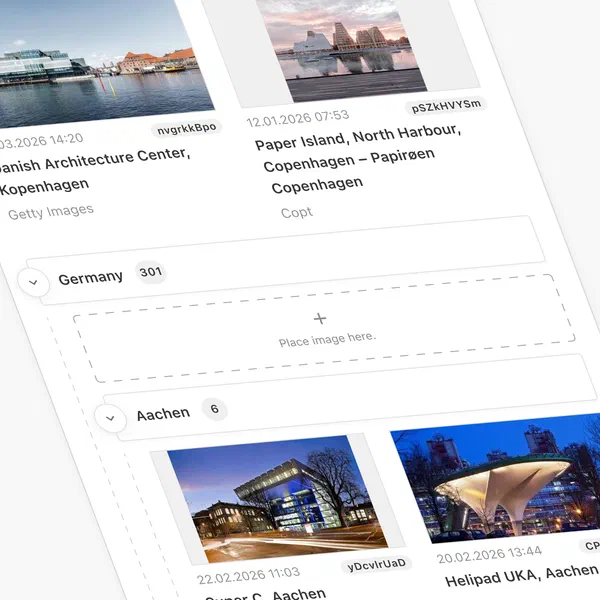
Image Collections allow editors to curate persistent, named sets of images for large or ongoing topics. They complement Media Library Dashboards (for research) and the Document Inbox (for short-term article work). Collections are shared across the project and can be browsed directly from the editor when picking images for a document.
They are curated, folder-like groupings with support for nested sub-groups, drag-and-drop ordering, direct uploads and real-time collaboration.
Adding & Organizing Images
You can add one or multiple images from any media library dashboard. Images can also be uploaded directly from your file system or an external source by dragging them into a collection or using the upload button. Images can be grouped into subgroups, with up to six levels of nesting. You can create an unlimited number of groups, add them to other collections or ungroup them.
Multi-select and Batch Actions
Similar to the Media Library, each image in a collection has a context menu with actions: add to another collection, send to inbox, store or remove it from the archive (use2025Behavior required), or remove it from the collection.
It is also possible to open the detail view of each image to edit its metadata.
You can select multiple images and apply any of these actions in a single batch operation.
Configuration
Add imageCollections to the project config and reference it in the editor settings main navigation:
// project config
imageCollections: {
  pageTitle: {en: 'Image Collections'},
  mediaTypes: ['images', 'infographics'],
  useDashboard: 'myMediaLibraryDashboard'
}
// editor settings, mainNavigation
{
  liItem: 'imageCollections'
}
After configuration, activate document permissions for the built-in Collections content type in the project settings.
Users also need read permissions on all configured mediaTypes to access Image Collections.
 For full (technical) documentation of this feature, see the Image Collections Guide.
Public API Endpoint to get the Usage Log of a Media Library Entry 🎁
A new endpoint has been added, GET /api/:apiVersion/mediaLibrary/:id/usageLog, which returns all usage log entries for the specified media library entry. Further details can be found in the Get the Usage Log of a Media Library Entry endpoint documentation.
Public API Operations to Modify Media Library Entry Usage Log Entries 🎁
The Media Library Entry patch endpoint in the public API has been extended to allow external systems (e.g. print system) to report the usage of a media library entry and provide the details.
Add a new entry:
PATCH /api/2026-05/mediaLibrary/{id}
{
  "preserveUpdatedAt": true,
  "patches": [
    {
      "operation": "addUsageLogEntry",
      "value": {
        "state": "pending", // Optional 'pending' or 'confirmed' (default: 'pending')
        "purpose": "print", // Required handle of usage log purpose
        "publicationDate": "2026-05-01T11:00:00.000Z", // Required when state is 'confirmed'
        "url": "http://localhost", // Optional link to external editor or delivery
        "params": {} // Any value for params defined in the `paramsSchema` of the selected purpose
      }
    }
  ]
}
Update an entry:
PATCH /api/2026-05/mediaLibrary/{id}
{
  "preserveUpdatedAt": true,
  "patches": [
    {
      "operation": "updateUsageLogEntry",
      "usageLogEntryId": "g1x419UgQSS5",
      "value": {
        "state": "confirmed", // Required for updates
        "purpose": "print",
        "publicationDate": "2026-05-01T11:00:00.000Z",
        "url": "http://localhost",
        "params": {
          "medium": "Paper"
        }
      },
      "oldValue": {} // Optional expected state condition
    }
  ]
}
Remove an entry:
PATCH /api/2026-05/mediaLibrary/{id}
{
  "preserveUpdatedAt": true,
  "patches": [
    {
      "operation": "removeUsageLogEntry",
      "usageLogEntryId": "g1x419UgQSS5"
    }
  ]
}
Create usage log entries on publish 🎁
The function mediaLibraryApi.addUsageLogEntriesForMediaInDocument() has been introduced to make it easier to create usage log entries. This function is intended to be used in a post publish hook and will add usage log entries for any referenced media library entries which do not already have a usage log entry for the current document. The entry will automatically be marked as ‘confirmed’ so any mandatory params must be provided.
liServer.registerInitializedHook(() => {
  const mediaLibraryApi = liServer.features.api('li-media-library')
  liServer.registerPublicationHooks({
    async postPublishHookAsync({documentVersion}) {
      await mediaLibraryApi.addUsageLogEntriesForMediaInDocument({
        documentVersion,
        purpose: 'web',
        url: `https://example.com/my-slug-${documentVersion.id}`, // Optional
        params: {medium: 'Internet'} // Required params mandatory
      })
    }
  })
})
Internal Usage Log Purposes 🎁
Usage log purposes can now be flagged as internal. When set to true it prevents a user from creating, updating or deleting entries for the purpose within the editor. A read-only entry will still be visible within the UI. This is intended to be used alongside the addUsageLogEntriesForMediaInDocument function to create permanent entries.
Note: setting internal: true on an existing purpose will hide the editor controls for that purpose, so any users who previously edited usage log entries of that purpose will lose that ability.
{
  mediaCenter: {
    usageLog: {
      purposes: [
        {
          handle: 'web',
          label: 'Web',
          internal: true // <-- New property
        }
      ]
    }
  }
}
Tabs in Media Library Sidepanels and Dialogs 🎁
When editors open the image, video, or file sidepanel in a document, or use a media selection dialog, the media library is now organized into tabs. Each tab corresponds to a configured media library dashboard, a media source, or image collections (if enabled on the project).
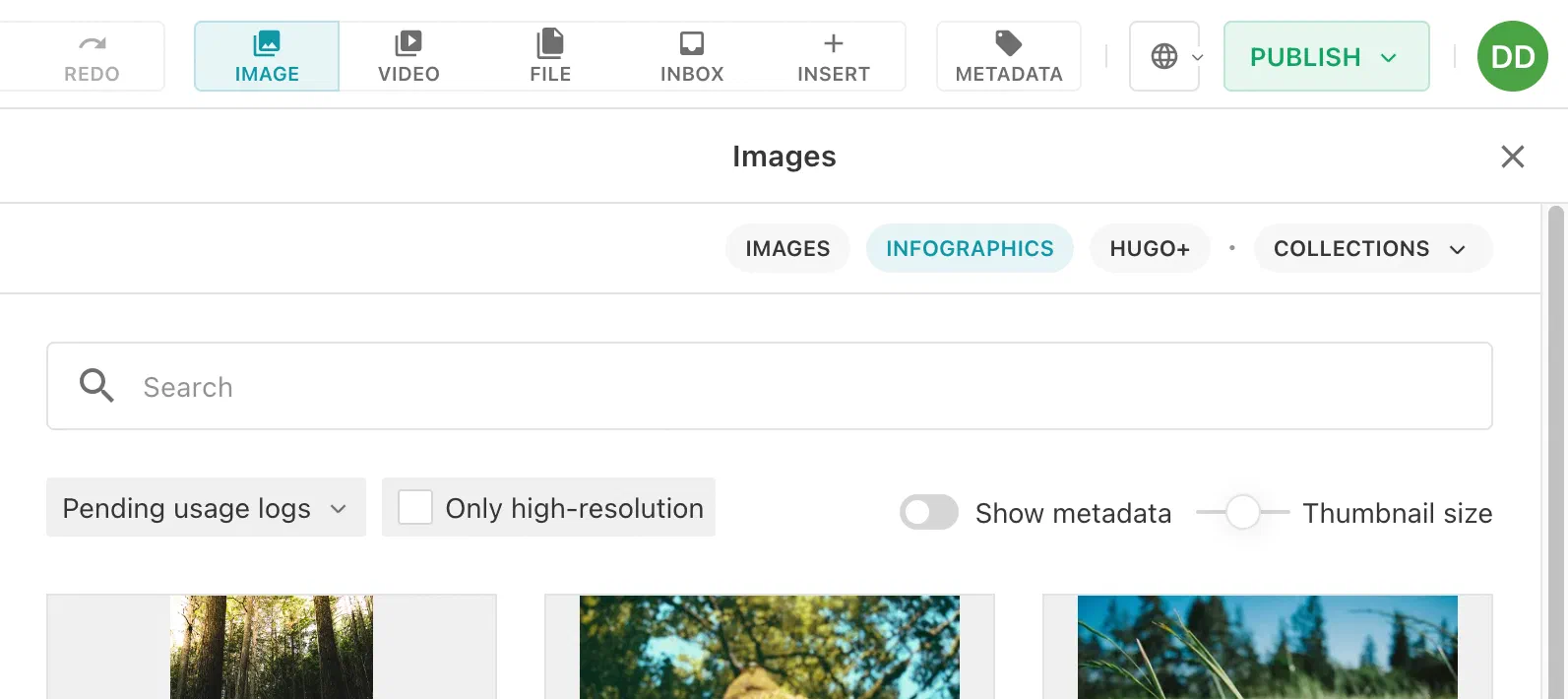
This replaces the previous behavior where media was grouped by media type. The old appearance is deprecated and will be removed in release-2026-11.
Configuration
contentTypes[].editor.images.useDashboard, contentTypes[].editor.videos.useDashboard, and contentTypes[].editor.files.useDashboard now accept a single dashboard handle or an array of handles. Each dashboard in the array becomes a tab.
editor: {
  images: {useDashboard: ['images', 'infographics']},
  videos: {useDashboard: 'reels'}
}
If no useDashboard is configured on a content type, a single “Feed” tab with all media grouped by type is shown instead. This is the old behavior and is now deprecated.
For full configuration details, refer to the Content Types reference.
Image Collections
For the dialog used to add an image to a collection, imageCollections.useDashboard also accepts an array of dashboard handles.
imageCollections: {
  useDashboard: ['images', 'infographics']
}
Poster Images
For the dialog used to select a poster image for a video, we introduce ui.config.useDashboard on li-poster-image and ui.config.posterImageUseDashboard on li-video-reference metadata plugins. You can use these to configure which dashboards appear when selecting a poster image.
Allowed Media Types 🎁
The new contentTypes[].allowedMediaTypes configuration enforces that only specific media types can be placed in a document.
allowedMediaTypes: {
  mediaImage: ['myImage', 'myInfographic'],
  mediaVideo: ['myVideo'],
  mediaFile: ['myFile']
}
If allowedMediaTypes is not configured, all media types are allowed (default behavior).
It is possible to configure media library dashboards or image collections in sidepanels and dialogs in such a way that they show media types not listed in allowedMediaTypes. If a user tries to insert such an asset into a document, an error is shown. We recommend configuring dashboards with appropriate baseFilters so that only allowed media types are shown in the first place.
For full configuration details, refer to the Content Types reference.
Media Library Batch Metadata Editing 🎁
The Media Center already supports batch actions such as archiving, deleting, and moving assets to an inbox. Metadata editing is now available as an additional batch action, making it easy to correct or enrich metadata across many assets at once.
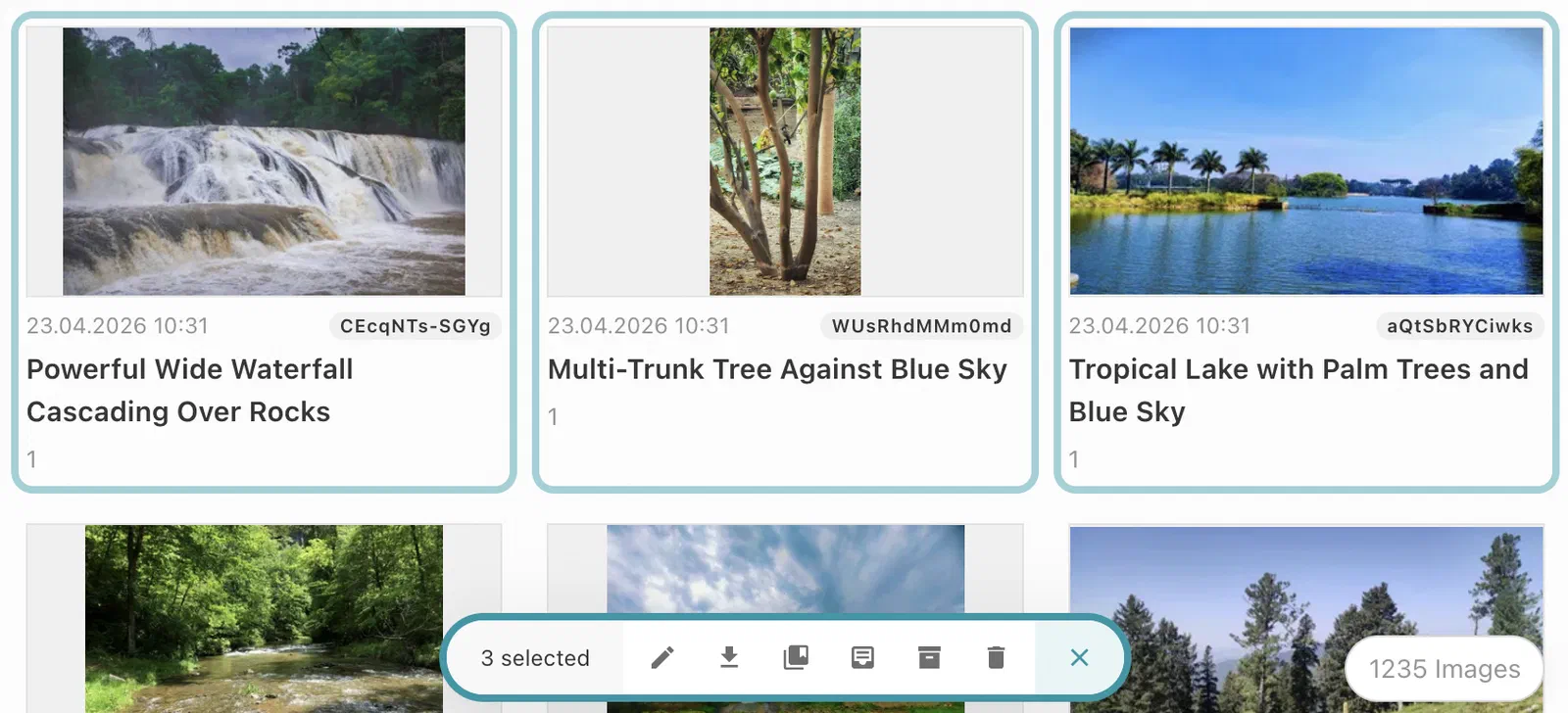
Editors can select multiple assets and edit their metadata in a single combined dialog. The dialog shows thumbnails for each selected asset alongside status indicators for unsaved changes, validation errors, and saving state. Fields that differ across selected assets are clearly marked: leaving a field unchanged keeps each asset’s original value, while editing it applies the new value to all selected assets.
This feature is automatically available in all Media Center dashboards. No configuration required.
For more information, see the Batch Actions documentation.
Norwegian UI Translations 🎁
The Livingdocs Editor is now available in Norwegian Bokmål (nb-NO) and Norwegian Nynorsk (nn-NO). The translations are automatically applied when the browser language is set to either variant.
For setup instructions, see the Configure Multi-Language UI guide.
Reduce Supply Chain Attack Vector 🎁
Livingdocs Server now supports running with ignore-scripts=true in npm. This prevents arbitrary scripts from running during package installation, reducing the attack surface for supply chain attacks.
To verify that no dependency in your tree depends on postinstall scripts, you can use the following script:
npm query ":attr(scripts, [postinstall]), :attr(scripts, [preinstall]), :attr(scripts, [install])" \
  | jq -r '.[].name' \
  | grep -vxE 'protobufjs|exifreader|leveldown|sharp|@parcel/watcher' \
  | sort -u
If there are modules listed, please verify their
postinstalldeclaration in the package.json does not use logic your instance depends on.Once you don’t depend on any
postinstallscripts anymore,
please setignore-scripts=truein your.npmrcfiles in every livingdocs project.package-lock=true ignore-scripts=true //registry.npmjs.org/:_authToken=${NPM_TOKEN}
Vulnerability Patches
We are constantly patching module vulnerabilities for the Livingdocs Server and Livingdocs Editor as module fixes are available. Below is a list of all patched vulnerabilities included in the release.
Livingdocs Server
This release we have patched the following vulnerabilities in the Livingdocs Server:
- CVE-2026-44902 / GHSA-q7rr-3cgh-j5r3 patched in @opentelemetry/sdk-node v0.217.0
Livingdocs Editor
This release we haven’t patched any vulnerabilities in the Livingdocs Editor. There are no known vulnerabilities. 🎉
Patches
Patches typically fix bugs and apply improvements within the current release. Keeping your deployment up-to-date with the latest patch version means you benefit from those fixes. No explicit action is required per patch — bumping the version is enough.
Livingdocs Server Patches
v301.1.58: fix(deps): automatically patch Node.js vulnerabilities
v301.1.57: fix(deps): automatically patch Node.js vulnerabilities
v301.1.56: fix(publish-control): Skip empty and invalid metadata dates in visiblePublicationDatePreference
v301.1.55: fix(deps): update dependency proxy-addr from 2.0.7 to 2.0.8 [security]
v301.1.54: fix(deps): update dependency fastify from 5.12.1 to 5.12.5 [security]
v301.1.52: chore(ci): move livingdocsIO/actions to 1d986e6
v301.1.51: chore(ci): wait up to 25 minutes for the unit tests before releasing
v301.1.50: fix(deps): update dependency sharp from 0.35.4 to 0.35.5 [security]
v301.1.49: fix(migrations): Skip the reference index update when no reference changed
v301.1.48: fix(media-library): Preserve updateAt when modifying usage logs
v301.1.47: fix(deps): automatically patch Node.js vulnerabilities
v301.1.46: fix(deps): automatically patch Node.js vulnerabilities
v301.1.45: fix: Use correct warning type for all breaking changes
v301.1.44: fix(deps): automatically patch Node.js vulnerabilities
v301.1.43: fix(deps): update dependency nodemailer from 9.0.1 to 9.1.1 [security]
v301.1.42: fix(deps): update dependency sharp from 0.35.3 to 0.35.4 [security]
v301.1.41: chore(benchmarks): import job-queue-scripts default export
v301.1.40: fix(deps): update dependency fastify from 5.8.5 to 5.12.1 [security]
v301.1.39: fix(media-library): rethrow postgres errors from addEntries inside a transaction
v301.1.38: fix(deps): automatically patch Node.js vulnerabilities
v301.1.37: fix(retresco): Preserve document updatedAt when re-enriching
v301.1.36: fix(deps): automatically patch Node.js vulnerabilities
v301.1.35: chore(image-processing): compare decoded pixels instead of png bytes in test
v301.1.34: fix(deps): update dependency undici from 8.5.0 to 8.9.0 [security]
v301.1.33: fix: restore login through forward proxy
v301.1.32: fix(deps): automatically patch Node.js vulnerabilities
v301.1.31: fix(deps): automatically patch Node.js vulnerabilities
v301.1.30: fix(deprecations): Don’t define breaking change date for 3 deprecations
v301.1.29: fix(includes): speed up regression test
v301.1.28: fix(deps): automatically patch Node.js vulnerabilities
v301.1.27: fix(image-processing): Avoid truncated flag for exact file size match
v301.1.26: fix(deps): automatically patch Node.js vulnerabilities
v301.1.25: fix(media-library): add file extension to image downloads in Chrome and Edge
v301.1.24: fix(deps): bump @opentelemetry to ^0.219 to remove vulnerable protobufjs 8.0.1
v301.1.23: fix: comply with demo platform code rules
v301.1.22: fix: Trigger release after deps update
v301.1.21: fix(deps): update livingdocs-patch
v301.1.20: fix: remove server-lib workspace
v301.1.19: fix(blob-store): prevent S3 socket exhaustion on partial image reads
v301.1.18: fix(deps): update dependency nodemailer from 8.0.7 to 9.0.1 [security]
v301.1.17: fix(channel-config): allow nb-NO and nn-NO in translatable strings
v301.1.16: chore(example-server): Add image read permissions to Readers group
v301.1.15: fix(repl): update module imports
v301.1.14: fix: use createRequire for memdown instead of async dynamic import
v301.1.13: fix(deps): update livingdocs-patch from 34.0.4 to v34.0.5
v301.1.12: fix(deps): update dependency exifreader from 4.38.1 to 4.39.0 [security]
v301.1.11: fix(deps): update dependency @livingdocs/framework from 34.0.3 to v34.0.4
v301.1.10: fix: nest replaceTranslations flag in options property
v301.1.9: fix(public-api): Expose getAllKeysForMediaLibraryEntry
v301.1.8: fix: remove #lib alias
v301.1.7: fix(deps): update dependency ws from 8.20.0 to 8.20.1 [security]
v301.1.6: fix(migrations): Only generate statistics and references with content
v301.1.5: test: Adjust transform tests to account for serialized component IDs
v301.1.4: fix(image-collections): add breaking change to not use any dashboards with handle imageCollections
v301.1.3: fix(blob-store): suppress late AbortError from Azure download streams
v301.1.2: fix(deps): update dependency @opentelemetry/sdk-node from 0.215.0 to 0.217.0 [security]
v301.1.1: fix(release-2026-05): Update framework to v34.0.3 (release-2026-05 tag)
Livingdocs Editor Patches
v123.21.59: test(tasks): cover the other groups’ deadline sort and expanding the done group
v123.21.58: fix(deps): automatically patch Node.js vulnerabilities
v123.21.57: fix(deps): update dependency fastify from 5.12.1 to 5.12.5 [security]
v123.21.56: fix(deps): update dependency js-yaml from 5.2.2 to 5.4.1 [security]
v123.21.55: fix(deps): update dependency @livingdocs/framework from 34.0.10 to v34.0.11
v123.21.54: chore(ci): wait up to 25 minutes for the unit tests before releasing
v123.21.53: fix(proxy): survive a browser that drops a websocket before the upstream upgrade
v123.21.52: fix(deps): update dependency @livingdocs/framework from 34.0.6 to v34.0.10
v123.21.51: fix(deps): automatically patch Node.js vulnerabilities
v123.21.50: fix(webpack): Prevent dart-sass BOM from breaking scoped styles
v123.21.49: fix(deps): update dependency sanitize-html from 2.17.5 to 2.17.7 [security]
v123.21.48: fix(media-library): keep the search query when switching panel tabs
v123.21.47: fix(properties): correct German word order in char-limit labels
v123.21.46: fix(deps): update dependency pdfjs-dist from 5.7.284 to 6.2.108 [security]
v123.21.45: fix(deps): update dependency sanitize-html from 2.17.4 to 2.17.5 [security]
v123.21.44: refactor(document-inbox): Use clearer names in drag auto-scroll
v123.21.43: fix(deps): update dependency js-yaml from 4.3.0 to 5.2.2 [security]
v123.21.42: fix(multilist-editor): Use correct permission to enable multilist editor
v123.21.41: fix(publish): align content feedback title with redesigned panels
v123.21.40: fix(deps): update dependency @fastify/static from 9.1.3 to 10.1.2 [security]
v123.21.39: fix(i18n): make image and video upload messages translatable
v123.21.38: fix(deps): update dependency axios from 1.16.0 to 1.18.0 [security]
v123.21.37: fix(draft-storage): Persist unsaved content while saving is disabled
v123.21.36: fix(deps): update dependency @babel/core from 7.29.0 to 7.29.6 [security]
v123.21.35: fix(dates): add nb-NO and nn-NO to relative-time locales
v123.21.34: fix(metadata): report initial form validity on mount
v123.21.33: fix: toggle include overrides of only focused component
v123.21.32: fix: keep drag scroll working after window resize
v123.21.31: fix(metadata): initialize named crops once the image is available
v123.21.30: fix(deps): bump undici to 7.28.0 and form-data to 4.0.6
v123.21.29: fix(buy-in): show expiry hint immediately after requesting
v123.21.28: fix: trigger a new release version
v123.21.27: fix(deps): ship angular, vue and vue-demi TuxCare forks as direct deps
v123.21.26: fix: show component groups with translated labels
v123.21.25: fix(media-library): Prevent li-metadata-translations save on open
v123.21.24: fix(deps): update livingdocs-patch from 34.0.5 to v34.0.6
v123.21.23: fix(deps): update dependency js-yaml from 4.1.1 to 4.2.0 [security]
v123.21.22: fix(media-library): Show file type error in upload center dialog
v123.21.21: chore(embeds): Access embed data consistently
v123.21.20: fix(image-collections): enable batch metadata editing for image collections
v123.21.19: fix(deps): update livingdocs-patch from 34.0.4 to v34.0.5
v123.21.18: fix(upload): Enable save button when EXIF extraction fills required metadata
v123.21.17: fix: detect inbox drags and don’t count them as upload drags
v123.21.16: fix(deps): update dependency axios from 1.15.2 to 1.16.0 [security]
v123.21.15: fix(lists): Translate link text
v123.21.14: fix(deps): update dependency @livingdocs/framework from 34.0.3 to v34.0.4
v123.21.13: fix(scrollbars): styling and active pill scrolling in media panel
v123.21.12: fix(media-library): Hide internal usage log purposes when downloading
v123.21.11: fix(project-config): show kordiam form and nav
v123.21.10: fix(drafts): Reload editor when document contentType changes via remote update
v123.21.9: fix(deps): update dependency sanitize-html from 2.17.3 to 2.17.4 [security]
v123.21.8: fix(image-collections): add imageCollections as coreItem instead of enrichedItem
v123.21.7: fix(image-collections): use container’s filtered items for move position
v123.21.6: fix(deps): automatically patch Node.js vulnerabilities
v123.21.5: fix(includes): expose params getter to maintain public API for tests
v123.21.4: fix: hide images count earlier to prevent overlap with batch actions
v123.21.3: fix(media-library): Hide state of media source items
v123.21.2: fix(publish-control): Use correct publishControlMode for labels
Icon Legend
- Breaking changes: 🔥
- Feature: 🎁


