To get an overview about new functionality, read the Release Notes.
To learn about the necessary actions to update Livingdocs to release-2026-07, read on.
Attention: If you skipped one or more releases, please also check the release-notes of the skipped ones.
Webinar
- Feature Webinar Recording | Passcode:
E?963bz# - Feature Webinar Slides
- Release Newsletter Subscription
System Requirements
Suggested
| Name | Version |
|---|---|
| Node | 24 |
| NPM | 11 |
| Postgres | 18 |
| Elasticsearch | 9 |
| OpenSearch | 3 |
| Redis | 8 |
| Valkey | 9 |
| Livingdocs Server Docker Image | livingdocs/server-base:24 |
| Livingdocs Editor Docker Image | livingdocs/editor-base:24 |
| Browser Support | Chrome >= 150, Edge >= 150, Firefox >= 152, Safari >= 26.5 |
Minimal
| Name | Version |
|---|---|
| Node | 22.17.1 |
| NPM | 10 |
| Postgres | 14 |
| Elasticsearch | 8 |
| OpenSearch | 2 |
| Redis | 6.2 |
| Valkey | 7 |
| Livingdocs Server Docker Image | livingdocs/server-base:22 |
| Livingdocs Editor Docker Image | livingdocs/editor-base:22 |
| Browser Support | Chrome >= 138, Edge >= 138, Firefox >= 140, Safari >= 18.5 |
Deployment
Before the deployment
No pre-deployment steps are required before rolling out this release.
Rollout deployment
Migrate the Postgres Database
When upgrading, first run the database migrations. At Livingdocs, we run this command in an initContainer on Kubernetes.
All migrations should execute quickly and not lock write-heavy tables.
# 217-backfill-image-collection-unique-ids.js
#   Backfills unique-id entries for existing image collections into
#   `document_unique_ids` so that duplicate collection titles are detected
#   going forward. Existing duplicates are left untouched, not reported as errors.
# 217-oauth-grants.js
#   Creates the `oauth_grants` table used by the new Authorization Server and by
#   editor session cookies, and backfills active `user_sessions` rows as legacy
#   grants. Non-destructive to `user_sessions`; runs regardless of whether the
#   Authorization Server is enabled.
# 218-remove-channel-mode-column.js
#   Drops the `channels.mode` column as part of the huGO print removal.
livingdocs-server migrate up
After the deployment
Recreate the Elasticsearch indices
This release adds Norwegian language support (Bokmål nb and Nynorsk nn) across the drafts, publications, and media library indices, and language-aware text fields plus a German decompounder to the media library.
The change is backwards compatible: until the indices are recreated, the new language-specific fields are silently skipped and search keeps working as before.

To enable Norwegian language support, the affected Elasticsearch indices need to be recreated. This is not a quick operation:
livingdocs-server elasticsearch-index --recreate --handle=<type>
--recreate deletes the existing index and creates a fresh one, then repopulates it
by re-indexing all documents in a background job. Depending on the number of documents,
this can take a while to complete. Until the background indexer finishes, the index is
incomplete and search returns partial results, so plan a maintenance window and run it per
--handle (drafts, publications, media library).
Rollback
To roll back the database migrations of this release, run:
livingdocs-server migrate down
The 217-oauth-grants.js down migration drops the oauth_grants table; user_sessions is left untouched by the up migration, so rolling back to the previous server build is safe. The exception is any (user, device) whose editor session cookie was rotated to the new li.rt_… shape during the new-build window — those sessions are invalidated on the rolled-back build and the affected user has to re-authenticate on that device. Other devices are unaffected.
Breaking Changes 🔥
Replacement of authApi.createAccessToken with createAccessTokenV2
Code: LIBREAKING069
The server API authApi.createAccessToken() has been replaced by authApi.createAccessTokenV2(). The new function takes a flat userId instead of a nested user object and returns an object with a .token property rather than the token string directly.
// before
const token = await authApi.createAccessToken({user: {id: userId}, sid})

// after
const {token} = await authApi.createAccessTokenV2({userId, sid})
Detect
In the project’s server code, a call to createAccessToken on the authentication API (liServer.features.api('li-authentication')). Search for createAccessToken and ignore the createAccessTokenV2 hits (e.g. rg 'createAccessToken\b' | rg -v createAccessTokenV2).
Fix
Rename the call to createAccessTokenV2 and adjust the arguments: pass userId instead of user: {id}. sid, projectId, and projectHandle are accepted; the former ipAddress, userAgent, and liClient arguments are no longer used. Read the token from the returned object’s .token property instead of using the return value as the token.
Removal of the Google Vision integration
Code: LIBREAKING070
The Google Vision integration, including the li-google-vision metadata plugin, has been removed. It was deprecated in release-2026-01. We do not expect any customer still uses it; if you do, contact your Customer Solutions contact for migration support.
Detect
In the server config, integrations.googleVision; and in the project config, settings.integrations.googleVision. Search for googleVision.
Fix
Remove integrations.googleVision from the server config and settings.integrations.googleVision from the project config, along with any use of the li-google-vision metadata plugin. No replacement is provided.
Removal of the huGO print integration and channel edit mode
Code: LIBREAKING071
The huGO print integration and the editor “Print Mode” — deprecated in release-2026-01 — are now fully removed across server and editor: the print API, the print preview and template-selection UI, the print edit mode, the li-print metadata plugin, and the related config. The content type print config’s componentMap, kept at deprecation time, is now removed with the rest of the print config. The huGO agency import (drag-and-drop import and feeds; resourceApi, importApi, feedApi, hugoProxy) is unaffected.
Detect
Search project, content type, channel and editor configs (including test fixtures) for any of the following. Each may appear as an object key (foo:) or be assigned from a variable, so match the token rather than requiring a trailing colon:
editModein the project settings.- A content type
printconfig — look forprintalongsideenabled,enableStepZoomingorcomponentMap. - The channel
modeproperty set to'default'or'print'. app.editable.printin the editor config (aprintkey undereditable) — it now logs a removal warning.- Downstream code calling the removed APIs — the
printApioffeatures.api('li-hugo'),/hugo/printendpoints, or the editorprintProxy.
Fix
- Remove
settings.editMode, the content typeprintconfig (enabled,enableStepZooming,componentMap), the channelmodeproperty (also removed from theLivingdocsChannelschema), andapp.editable.printfrom all configs and test fixtures. Channels are always indefaultmode now. - The
channels.modecolumn is dropped automatically by migration218-remove-channel-mode-column; no manual data migration is needed. - Replace the removed UI and plugin:
- the
li-printmetadata plugin → a custom metadata plugin with metadata groups (replaces the print metadata section). - the huGO print preview → a custom preview function.
- the print-article create/copy dialog (and its router states) → a document creation flow.
- the
- Downstream code using
features.api('li-hugo').printApi,/hugo/print/*, the editorprintProxy, or the removededitor.printViewdefaults (enableStepZooming,zoomStep) must provide its own print client/proxy. Contact your customer solutions contact if you need support with the migration.
Removal of the search.metadataMapping server config property
Code: LIBREAKING072
The server config property search.metadataMapping has been removed. It was deprecated in release-2026-01. Metadata is now indexed via dynamic metadata mapping configured directly on metadata plugins: set indexing.behavior on the plugin and config.index: true on the field. The core li-* plugins already have indexing enabled.
// metadata plugin
{
  name: 'my-slug',
  indexing: {
    enabled: true,
    behavior: [{type: 'text'}, {type: 'keyword'}]
  },
  storageSchema: {type: 'string'}
}

// content type or media type config
{
  handle: 'slug',
  type: 'my-slug',
  config: {index: true}
}
Detect
In the server config, a metadataMapping key under search. Search for metadataMapping.
Fix
Remove search.metadataMapping. For each field previously mapped there, enable indexing on its metadata plugin via an indexing config and set config.index: true on the field in the content-type or media-type config. See the Publication Index metadata plugins documentation.
Removal of deprecated NZZ-specific search config properties
Code: LIBREAKING073
The 14 NZZ-specific search.* server config properties deprecated in release-2026-01 have been removed. They were accepted by the config schema but never consumed by any production code — they only emitted deprecation warnings. Any server config still setting them now fails validation at startup with a clear error.
Detect
In the server config, any of these keys under search: queryBuilderConfig, implementationVersion, reindexBatchSize, reindexDelay, reindexConcurrency, fields, gaussScale, gaussDecay, gaussOffset, gaussWeight, prefixQueryType, prefixQueryFields, fulltextQueryType, fulltextQueryOperator. Search for them together, e.g. rg '(queryBuilderConfig|implementationVersion|reindexBatchSize|reindexDelay|reindexConcurrency|gaussScale|gaussDecay|gaussOffset|gaussWeight|prefixQueryType|prefixQueryFields|fulltextQueryType|fulltextQueryOperator)' and confirm each hit sits under search.
Fix
Remove each of the listed properties from the search config. They had no effect, so no replacement is required.
Removal of the mediaCenter.usageLog config property
Code: LIBREAKING074
The project config property mediaCenter.usageLog has been removed and replaced by mediaCenter.usagePurposes: the nested usageLog.purposes array becomes the top-level usagePurposes array.
{
  mediaCenter: {
    // before
    // usageLog: {
    //   purposes: [{handle: 'web', label: {en: 'Web'}}]
    // }

    // after
    usagePurposes: [{handle: 'web', label: {en: 'Web'}}]
  }
}
Detect
In the project config, a usageLog key under mediaCenter. Search for usageLog and confirm the hit sits under mediaCenter (not an unrelated usageLog field elsewhere).
Fix
Move the entries from mediaCenter.usageLog.purposes into a top-level mediaCenter.usagePurposes array and delete the usageLog object. All purpose fields (handle, label, internal, paramsSchema) carry over unchanged. To record usage automatically on publish, add a contentType to the purpose and, optionally, a recordUsageLogEntry function. See the License Profiles guide for the full usagePurposes shape.
Removal of the publishType property on contentTypes and deliveries
Code: LIBREAKING076
The project config property publishType on contentTypes[] and deliveries[] has been removed and replaced by publishControl.mode. It was deprecated in release-2026-01. The property was accepted by the schema but only emitted deprecation warnings; any config still using it now fails validation at startup.
// before
{handle: 'article', publishType: 'export'}

// after
{handle: 'article', publishControl: {mode: 'export', deliveryHandle: 'print'}}
Detect
In the project config, a publishType key on a contentTypes[] or deliveries[] entry. Search for publishType.
Fix
Replace publishType with publishControl.mode, which takes the same values: publishType: 'publish' becomes publishControl: {mode: 'publish'}, and publishType: 'export' becomes publishControl: {mode: 'export', deliveryHandle: '<handle>'}. See the Export Mode guide for the full publishControl shape.
Removal of the LIFEAT011 in-house production media-type config
The LIFEAT011 customer feature has been removed without prior deprecation. It was a temporary workaround that marked an image as an “in-house production” and rendered an icon on image cards. With the cleanup of Media Library tags and the introduction of License Profiles, it is no longer needed. It was activated by a LIFEAT011 block on a mediaImage media type:
LIFEAT011: {
  inHouseHandle: 'author'
}
The config schema has been removed, so any leftover LIFEAT011 block now fails config validation on server startup.
Detect
In the server media-type configuration, a LIFEAT011 key on a mediaImage media type. Search for LIFEAT011 (e.g. rg 'LIFEAT011').
Fix
Remove the entire LIFEAT011: { ... } block from every affected mediaImage media type. This was a project-specific workaround, so most projects have no occurrences. No replacement config is required.
Deprecations ⚠️
Deprecation of the legacy li-authentication session methods
Codes: LIDEP085-createCookies, LIDEP085-extendSessionCookie, LIDEP085-hasActiveClients, LIDEP085-isActiveClient, LIDEP085-isActiveSession, LIDEP085-revokeSessionsOfUser, LIDEP085-revokeSessionOfUser
With the introduction of the Authorization Server and its oauth_grants-backed session storage, seven legacy li-authentication methods are deprecated and will be removed in release-2027-01. Each is replaced by a grant-based equivalent on the authentication API:
Deprecated method (LIDEP085-…) | Replacement |
|---|---|
createCookies | authApi.createSessionGrant({...}) |
extendSessionCookie | authApi.extendSessionGrant({...}) |
hasActiveClients | (await authApi.listGrantsForUser({userId, clientId: 'session'})).length > 0 |
isActiveClient | (await authApi.listGrantsForUser({userId, clientId: 'session', name: liClient})).length > 0 |
isActiveSession | authApi.isActiveToken({jti, type: 'user', grantId}) |
revokeSessionsOfUser | authApi.revokeGrants({userId, clientId: 'session'}) (pass excludeGrantId to keep the current session alive) |
revokeSessionOfUser | authApi.revokeGrant({grantId, userId}) |
Detect
In the project’s server code, a call to any of the seven methods above on the li-authentication API. Each call emits a throttled LIDEP085-* deprecation warning at runtime.
Fix
Migrate each call to the grant-based replacement listed above. The new methods operate on oauth_grants rather than user_sessions directly.
Features 🎁
License Profiles
Images come with rules about how they may be used, and breaking them exposes a newsroom to legal and financial risk. License profiles capture a contract’s terms in structured form: in which usage purposes (Web, Print, …) an image may be published, and whether each use has to be billed. A profile is assigned to a media library entry through the new li-license-profile metadata plugin and enforced by the system. Editors see color indicators and warnings while they work, publishing is blocked when license requirements are not met, and profiles that need a human decision route through an approval task. On publish, a usage log entry is recorded per image with the applied rule and a billing flag, the foundation for billing reports.
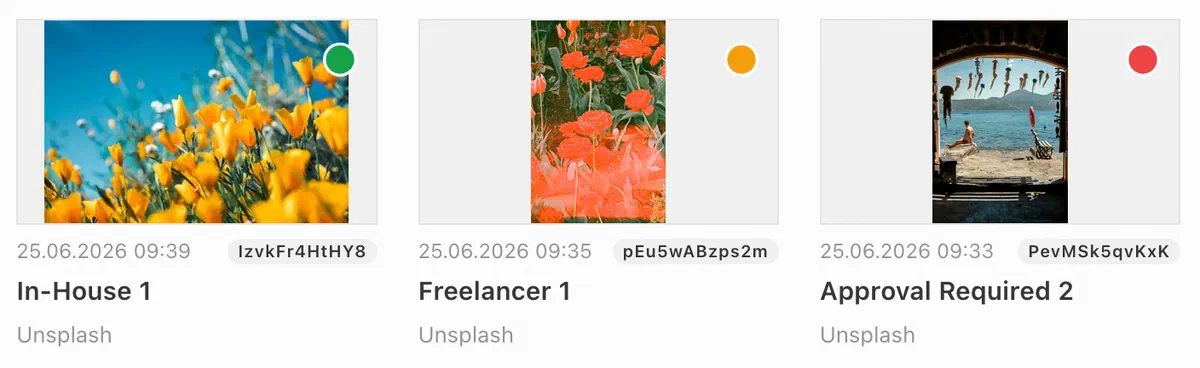
The feature is opt-in and activates once usage purposes and license profiles are configured.
License profiles require mediaLibrary.use2025Behavior: true. Reach out to your customer solutions contact for help getting started.For more information, see the License Profiles guide.
Media Center Image Billing
Photo desks can now flag which image usages require payment, review and resolve each flag by hand, filter media library dashboards by billing status and date, and export a billing report - all from the Media Center. Automatic billing decisions come from License Profiles.
- A billing status on every usage log entry - Billing required, No billing, or Billing unresolved - resolvable by hand while it is unresolved, then final. See Usage Log.
- Two media library date-range filters, Billed usages and Unresolved billing, narrow a dashboard to billed or still-unresolved usages in a date range. See Display Filters.
- A dashboard export button runs the current search and filters through a project-supplied function and downloads the result - a CSV, a per-photographer archive, whatever the integration returns. See Dashboard Export Flows.
The date filters read newly indexed usage log dates. After upgrading, reindex the media library (Server Administration / Operations / Indexing, or livingdocs-server elasticsearch-index --handle=li-media) so existing entries populate them.
Get All Media Library Entry Keys for Cache Purging
Sometimes clearing image caches after a revoke or modification is handled by external systems. In order to do this effectively all variant keys must also be cleared. To support this a new GET /api/:apiVersion/mediaLibrary/:id/keys endpoint has been added to the Public API. The :apiVersion must be 2026-03 or above. The return value of the endpoint will look like this:
{
  results: ['my/key.jpg', 'my/replaced-key.jpg', 'my/translated-key.jpg', 'v/my/variant-key.webp']
}
Image Card Metadata: Hide Labels and Limit Line Count
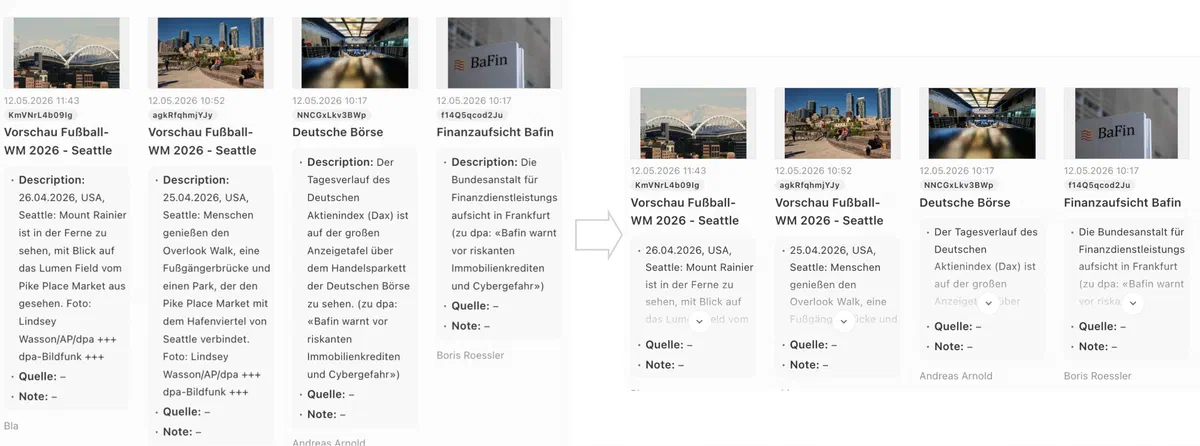
Photo editors work through large volumes of images and rely on the metadata shown on media library cards to judge each one at a glance. When a metadata value is long - like a description - the card grows tall and the dashboard becomes harder to scan, and repetitive labels waste space. Previously the only workaround was hiding the entire additional info box, which also hid useful information.
Two new options on additionalInfo let you keep cards compact without losing information:
showLabel: hide a property’s label when it’s redundant or self-explanatorymaxLineCount: collapse a value after a set number of lines, with a toggle to expand it
This feature is opt-in. See the Dashboard Cards documentation for the configuration details.
Media Library Tags
Editors browsing the Media Library now see more information for judging an image directly from its card - no need to open the detail view or lightbox first. Cards can show at a glance whether an image is already in a collection or inbox, how often it has been used, its license status, and archive state.
A new Display Settings dropdown on every Media Library dashboard lets each editor choose which tags appear, tailored per dashboard. Warning tags, such as an invalid image, are always shown. The lightbox displays every available tag, while the detail panel shows all of them except the usage references.
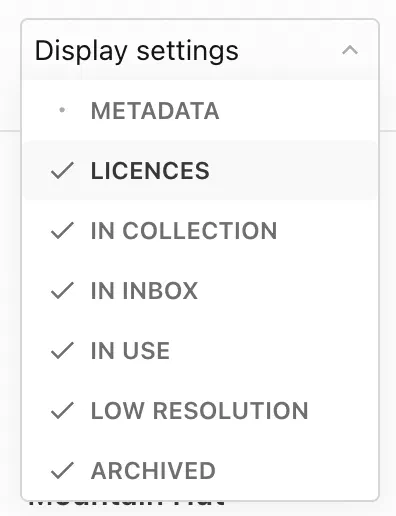
Which options are available depends on the dashboard’s asset type and your configuration. Usage counts require the Usage Log feature, and collection and inbox counts appear on image dashboards only when collections and inboxes are configured. The feature works automatically, with each tag option appearing based on your existing setup.

For more information, see the Card Tags and Display Settings documentation.
Retresco Main Entity Toggle
Retresco marks the strongest tags in a document as “main entities”. Livingdocs stored this state but never showed it. Editors can now see and change it themselves. A star toggle on each tag promotes or demotes it as a main entity.
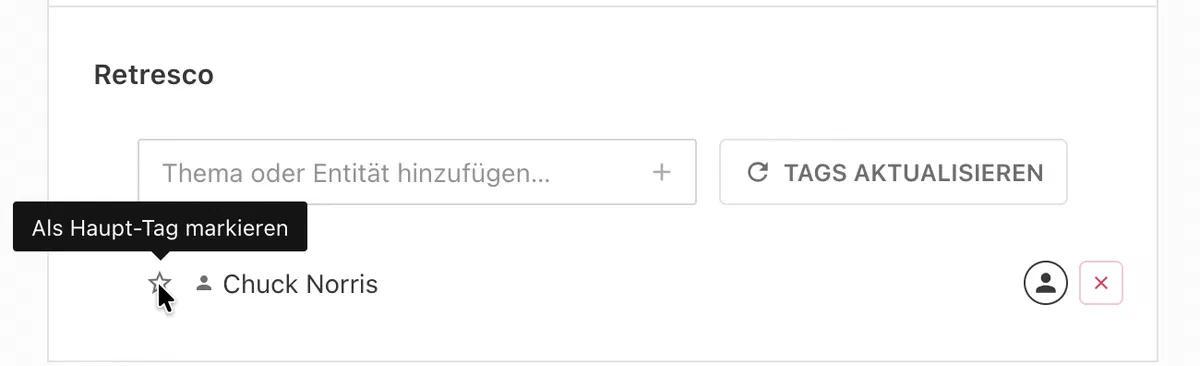
The feature is opt-in. Enable it per project with the new enableMainEntityOverride setting in the Retresco project config.
Before enabling this option, check with Retresco that main entities are enabled on your setup.The Retresco and iMatrics tag components also got a design refresh. Tags are now sorted by type and then alphabetically, and a new indicator marks tags an editor added or changed.
For more information and configuration details, see the Retresco integration documentation.
Copy Document Inbox in Copy and Print Flows
When editors create a copy or a print version of a document, the source document’s inbox is now carried over to the new document automatically.
The inbox is copied when the new document is created. This is now the default behavior for all document copy flows and print flows, so no configuration is required. Re-running a print flow to check the source for changes does not touch the inbox.
Inbox entries that the target document’s inbox config does not permit are not carried over. If this leaves an inbox group empty, the group itself is still copied.For more information, see the Document Copy Flows and Document Print Flows documentation.
Keep Inbox Items After Dropping Them Into a Document
By default, an inbox item is removed from the inbox as soon as it is dragged into a document. Some workflows call for the opposite. An editor researching images for an article might want to keep them in the inbox while trying out different options during production. For those setups the item should remain in the inbox after it has been placed.
A new project setting settings.inbox.keepItemsOnDrop controls this behavior. When set to true, inbox items stay in the inbox after being dropped into a document.
For more information, see the Document Inbox documentation.
Advanced Search Filters
Text search in the Media Library is now as capable as document search. Searches understand each entry’s language, split German compound words, support quoted phrases and boolean operators, and can even be driven by a full query syntax. Editors find the right asset faster with the terms they already type.
Language-Aware Text Search
Media Library entries are now indexed per locale with language-specific analyzers for German, English, French, Italian, Spanish, and Norwegian (Bokmål nb and Nynorsk nn). A German decompounder splits compound words, so searching “Dampf” now also finds “Dampfschiff”. Searches support exact phrases with quotes and prefix matching with word*, matching the behavior editors know from document search.
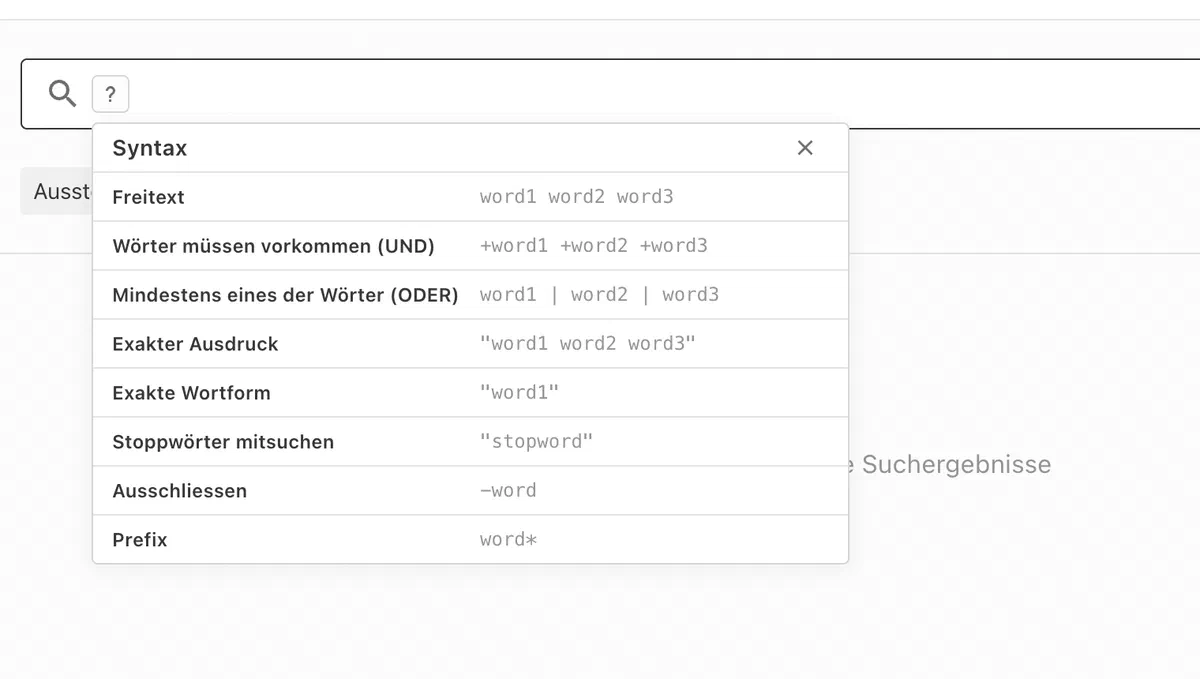
The language-aware fields and the decompounder require an Elasticsearch index recreation (livingdocs-server elasticsearch-index --recreate) to activate. Until the index is recreated, the new language fields are skipped and search keeps working as before.Search Syntax Cheat Sheet
A new help button next to the search field opens a flyout documenting the available query operators: free text, AND (+word), OR (|), exact phrase ("..."), exclude (-word), and prefix (word*). It appears on Media Library dashboards and on table dashboards that use the simple search strategy.
Expert Search Filter
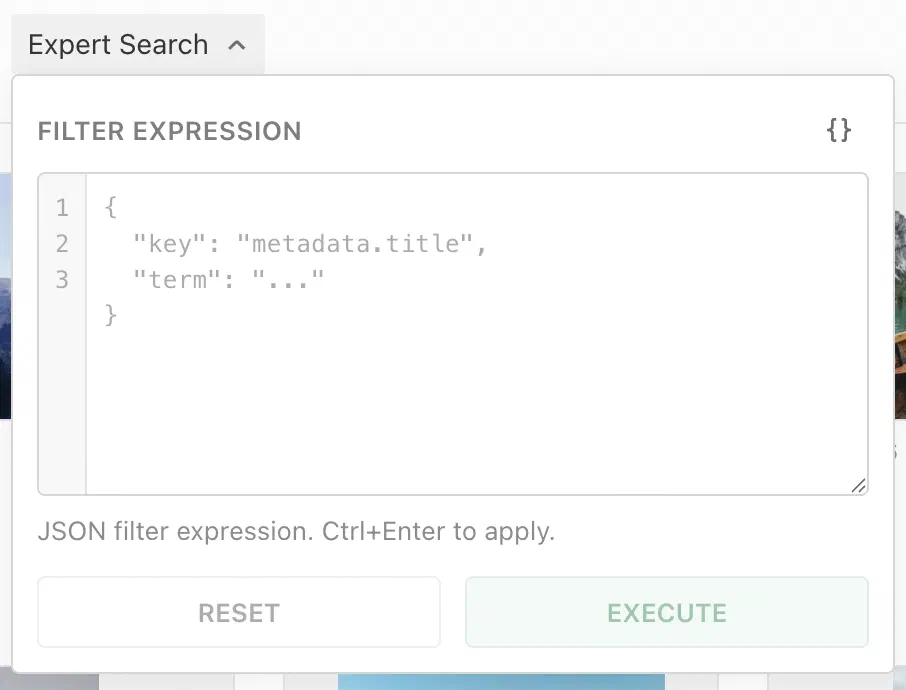
For power users, the new liExpertSearch display filter accepts a JSON filter expression directly in the dashboard search UI. It supports the full Livingdocs filter DSL: term, range, and exists expressions combined with and, or, and not. The editor validates input inline, auto-formats it, and applies it on Ctrl/Cmd+Enter. The expression is merged with the dashboard’s other active filters.
Enable it per dashboard via displayFilters:
{
  handle: 'myDashboard',
  displayFilters: ['liExpertSearch']
}
For more information, see the Expert Search documentation.
OAuth 2.1 Authorization Server
External integrations and editor add-ons need a standards-compliant way to obtain delegated access on a user’s behalf. Livingdocs now ships an OAuth 2.1 Authorization Server alongside the existing session flow. It supports the Authorization Code and Refresh Token grants, requires PKCE (S256), and works with public clients, resource indicators (RFC 8707), and Client Identifier Metadata Document clients.
When enabled, it exposes the following endpoints:
GET /.well-known/oauth-authorization-server(RFC 8414)GET /auth/authorizeGET|POST /auth/consentPOST /auth/tokenPOST /auth/token/revoke(RFC 7009)
The feature is opt-in and off by default. Enable it and register at least one client:
auth: {
  issuer: 'https://your-instance.example.com', // absolute URL the server advertises
  authorizationServer: {
    enabled: true,
    scopesSupported: ['...'],
    clients: [
      // pre-registered clients, or `{clientId: 'https://…'}` entries that
      // dereference a Client Identifier Metadata Document
    ]
    // optionally `resources: [...]` for per-resource scope sets (RFC 8707)
  }
}
Independently of the Authorization Server, editor session cookies now move from JWT-only to rotating refresh tokens backed by the new oauth_grants table. Legacy JWT cookies upgrade in place on the next refresh, so there is no user-visible change. This substrate also powers session-management capabilities such as listing active devices, per-device revocation, and refresh-token rotation with reuse detection through the new authApi grant methods (createSessionGrant, listGrantsForUser, revokeGrant, and others).
This change replaces the authApi.createAccessToken API (see LIBREAKING069) and deprecates seven legacy li-authentication session methods (see LIDEP085).Officially Support Node.js v26
Livingdocs Server and Editor now officially support Node.js v26. You can upgrade your runtime to v26; the previously supported versions continue to work.
Vulnerability Patches
We are constantly patching module vulnerabilities for the Livingdocs Server and Livingdocs Editor as module fixes are available. Below is a list of all patched vulnerabilities included in the release.
Livingdocs Server
This release we haven’t patched any vulnerabilities in the Livingdocs Server. There are no known vulnerabilities. 🎉
Livingdocs Editor
This release we haven’t patched any vulnerabilities in the Livingdocs Editor. There are no known vulnerabilities. 🎉
Patches
Here is a list of all patches after the release has been announced.
Livingdocs Server Patches
v308.1.44: fix(deps): automatically patch Node.js vulnerabilities
v308.1.43: fix(comyan): keep metadata validation errors on image upload
v308.1.42: fix(deps): automatically patch Node.js vulnerabilities
v308.1.41: fix(publish-control): Skip empty and invalid metadata dates in visiblePublicationDatePreference
v308.1.40: fix(ci): mount the demo’s decompounder folder in the Downstream Demo job
v308.1.39: fix(deps): update dependency proxy-addr from 2.0.7 to 2.0.8 [security]
v308.1.38: fix(deps): update dependency axios from 1.18.1 to 1.20.0 [security]
v308.1.37: fix(deps): update dependency @livingdocs/framework from 34.1.9 to v34.1.10
v308.1.36: fix(ci): pin npm-tag-latest to the release that loads
v308.1.35: fix(deps): update dependency sharp from 0.35.4 to 0.35.5 [security]
v308.1.34: fix(migrations): Skip the reference index update when no reference changed
v308.1.33: fix(media-library): Preserve updateAt when modifying usage logs
v308.1.32: fix(deps): automatically patch Node.js vulnerabilities
v308.1.31: fix(deps): automatically patch Node.js vulnerabilities
v308.1.30: fix: Use correct warning type for all breaking changes
v308.1.29: fix(deps): automatically patch Node.js vulnerabilities
v308.1.28: fix(deps): update dependency nodemailer from 9.0.3 to 9.1.1 [security]
v308.1.27: fix(deps): update dependency sharp from 0.35.3 to 0.35.4 [security]
v308.1.26: chore(benchmarks): import job-queue-scripts default export
v308.1.25: fix(deps): update dependency fastify from 5.9.0 to 5.12.1 [security]
v308.1.24: fix(media-library): score metadata.title separately from texts_*
v308.1.23: fix(public-api): Support API version 2026-07
v308.1.22: fix(search): decompound German only at index time
v308.1.21: fix(media-library): rethrow postgres errors from addEntries inside a transaction
v308.1.20: fix(deps): automatically patch Node.js vulnerabilities
v308.1.19: fix(indexing): Make indexing consumer stop less noisy on server shutdown
v308.1.18: fix(retresco): Preserve document updatedAt when re-enriching
v308.1.17: fix(deps): automatically patch Node.js vulnerabilities
v308.1.16: fix(deps): update dependency undici from 8.6.0 to 8.9.0 [security]
v308.1.15: fix: restore login through forward proxy
v308.1.14: fix(indexing): Always load the elasticsearch configs into the process (not only on live indexing)
v308.1.13: fix(indexing): Avoid caching empty media-library locale fields at startup
v308.1.12: fix(elasticsearch): Fix index behavior with translated fields
v308.1.11: fix(deps): automatically patch Node.js vulnerabilities
v308.1.10: fix(license-profiles): explicitly disable all license profile hooks when enabled is false
v308.1.9: fix(deprecations): Don’t define breaking change date for 3 deprecations
v308.1.8: fix(includes): speed up regression test
v308.1.7: fix(deps): automatically patch Node.js vulnerabilities
v308.1.6: fix(image-processing): Avoid truncated flag for exact file size match
v308.1.5: fix(media-library): add file extension to image downloads in Chrome and Edge
v308.1.4: fix(license-profile): allow internal usagePurposes without recordUsageLogEntry
v308.1.3: fix(print): Renumber huGO print breaking change to LIBREAKING071
Livingdocs Editor Patches
v126.1.41: test(tasks): cover the other groups’ deadline sort and expanding the done group
v126.1.40: fix(auth): Decide a failed reissue by its outcome, not by the browser clock
v126.1.39: fix(deps): automatically patch Node.js vulnerabilities
v126.1.38: fix(properties): show delete button for components in ticker entries
v126.1.37: fix(deps): update dependency fastify from 5.12.1 to 5.12.5 [security]
v126.1.36: chore(ci): move livingdocsIO/actions to ea0601d
v126.1.35: fix(deps): update dependency @livingdocs/framework from 34.1.9 to v34.1.10
v126.1.34: chore(ci): wait up to 25 minutes for the unit tests before releasing
v126.1.33: fix(proxy): survive a browser that drops a websocket before the upstream upgrade
v126.1.32: fix(deps): update dependency @livingdocs/framework from 34.1.8 to v34.1.9
v126.1.31: fix(deps): update dependency @livingdocs/framework from 34.1.7 to v34.1.8
v126.1.30: fix(deps): automatically patch Node.js vulnerabilities
v126.1.29: fix(config): rotate iframely api key
v126.1.28: fix(webpack): Prevent dart-sass BOM from breaking scoped styles
v126.1.27: fix(deps): update dependency fastify from 5.9.0 to 5.12.1 [security]
v126.1.26: test(media-library): scroll until every page is loaded in the pagination tests
v126.1.25: fix(media-library): keep the search query when switching panel tabs
v126.1.24: fix(license-profiles): don’t warn about license violations when disabled
v126.1.23: fix(properties): correct German word order in char-limit labels
v126.1.22: fix(deps): update dependency pdfjs-dist from 6.1.200 to 6.2.108 [security]
v126.1.21: fix(metadata): build image urls with crop and original dimensions
v126.1.20: fix(multilist-editor): Use correct permission to enable multilist editor
v126.1.19: refactor(tags): show variant all for media detail view
v126.1.18: fix(deps): update dependency @fastify/static from 9.1.3 to 10.1.2 [security]
v126.1.17: fix(metadata): only mark rendered properties as touched
v126.1.16: fix(i18n): make image and video upload messages translatable
v126.1.15: fix(license-profiles): treat missing enabled flag as enabled
v126.1.14: fix(draft-storage): Persist unsaved content while saving is disabled
v126.1.13: fix(dates): add nb-NO and nn-NO to relative-time locales
v126.1.12: fix(metadata): report initial form validity on mount
v126.1.11: fix: toggle include overrides of only focused component
v126.1.10: fix: keep drag scroll working after window resize
v126.1.9: fix(search): Stop cheat sheet flyout from being pushed below the button
v126.1.8: fix(media-library): add standard cost class translation to license profile form
v126.1.7: fix(media-library): hide license profile tag when profiles not configured
v126.1.6: fix(media-library): hide media state badge on empty image placeholder
v126.1.5: fix(metadata): initialize named crops once the image is available
v126.1.4: fix(license-profiles): define default display filter for li-license-profile
v126.1.3: fix(auth): Always refresh tokens, makes
auth.authTokenRenewalIntervalconfig obsoletev126.1.2: Revert “fix(release-2026-07): Update framework to v34.1.7 (release-2026-07 tag)”
Icon Legend
- Breaking changes: 🔥
- Feature: 🎁


