To get an overview about new functionality, read the Release Notes.
To learn about the necessary actions to update Livingdocs to release-2026-09, read on.
Attention: If you skipped one or more releases, please also check the release-notes of the skipped ones.
Webinar
System Requirements
Suggested
| Name | Version |
|---|---|
| Node | 24 |
| NPM | 11 |
| Postgres | 18 |
| Elasticsearch | 9 |
| OpenSearch | 3 |
| Redis | 8 |
| Valkey | 9 |
| Livingdocs Server Docker Image | livingdocs/server-base:24 |
| Livingdocs Editor Docker Image | livingdocs/editor-base:24 |
| Browser Support | Chrome >= 152, Edge >= 152, Firefox >= 154, Safari >= 26.6 |
Minimal
| Name | Version |
|---|---|
| Node | 22.17.1 |
| NPM | 10 |
| Postgres | 14 |
| Elasticsearch | 8 |
| OpenSearch | 2 |
| Redis | 7.4 |
| Valkey | 7 |
| Livingdocs Server Docker Image | livingdocs/server-base:22 |
| Livingdocs Editor Docker Image | livingdocs/editor-base:22 |
| Browser Support | Chrome >= 139, Edge >= 139, Firefox >= 142, Safari >= 18.6 |
Deployment
Before the deployment
No pre-deployment steps are required before rolling out this release.
Rollout deployment
Migrate the Postgres Database
When upgrading, first run the database migrations. At Livingdocs, we run this command in an initContainer on Kubernetes.
The migration executes quickly and does not lock write-heavy tables.
# 219-remove-legacy-sessions.js
#   Drops the unused `user_sessions` table and its `user_sessions_states` type.
#   Sessions have been stored in `oauth_grants` since release-2026-07
#   (migration `217-oauth-grants.js`). The `user_sessions_activity*` tables hold
#   concurrent-user statistics and are left untouched.
livingdocs-server migrate up
After the deployment
Reindex the Media Library Elasticsearch Index
This step applies to projects that configure mediaCenter.usagePurposes. Usage logging stays off until at least one purpose is defined, so a project without it has no usage log entries to index, nothing that queries them, and no post-deployment step to run.
This release indexes every media library usage log entry as its own nested object, which is what makes the new usage log search work (see Search Images by Usage Log Details). Existing entries only gain the new fields once the media library index has been reindexed.
The mapping additions are additive and are patched in place, so a plain reindex is enough. A --recreate is only necessary if Elasticsearch rejects the mapping patch as incompatible.
livingdocs-server elasticsearch-index --handle li-media
 Usage log filters now compile to nested Elasticsearch queries. Entries that have not been reindexed no longer match them, so dashboards and base filters that rely on usage log criteria return incomplete results until the reindex has finished. Schedule it as part of the rollout.
Rollback
The 219-remove-legacy-sessions.js migration has no down migration - the user_sessions table is dropped for good.
Rolling back to a release-2026-07 build is still safe. That release already keeps sessions in oauth_grants and never reads user_sessions. Rolling back two releases is not: release-2026-05 and older use user_sessions as the session store and fail against a database where the table is gone.
To roll back the Elasticsearch changes, no action is required. The new media library fields are additive and are ignored by an older server build.
Breaking Changes 🔥
Removal of mediaLibrary.disableImageEditingInDocuments
Code: LIBREAKING078
The server config property mediaLibrary.disableImageEditingInDocuments has been removed and now throws during startup. It was deprecated in release-2026-03 (LIDEP078). Image editing in documents is enabled by default, along with the image variant creation it depends on.
Setups that cannot apply image modifications, for example because images are delivered by an external DAM, can turn image editing off with the server config property mediaLibrary.disableImageEditing, added in a patch of this release. Unlike the removed property it also hides redaction in the media library. Cropping stays available.
Detect
In the server config, disableImageEditingInDocuments.
Fix
Remove the property. If image editing should be available, no further change is needed.
To keep image editing turned off, upgrade to at least @livingdocs/server@312.0.22 and @livingdocs/editor@128.1.21, then replace it with disableImageEditing. Earlier patch versions of release-2026-09 reject the property during startup.
 mediaLibrary: {
   use2025Behavior: true,
-  disableImageEditingInDocuments: true
+  disableImageEditing: true
 }
This is not a one-to-one rename: disableImageEditing hides the “Adjust” button in documents and metadata as well as the redaction button in the media library, where disableImageEditingInDocuments kept redaction and colour corrections in the media library. For more information, see the Disabling Image Editing documentation.
Removal of the Push Notifications Feature
Codes: LIBREAKING079-feature:li-push-notifications, LIBREAKING079-metadataPlugin:li-push-notifications, LIBREAKING079-serverConfig:pushNotifications, LIBREAKING079-serverConfig:push_notifications, LIBREAKING079-channelConfig:settings.pushNotifications
The push notifications feature has been removed. It was deprecated in release-2026-03 (LIDEP076) in favour of the li-push-messages metadata plugin. Configuring any part of it now throws during server startup or project config validation, and the /push-notifications endpoints, the firebase, ethinking and airship providers and the editor side panel are gone.
Documents that already carry li-push-notifications metadata keep validating and indexing - the plugin declaration is retained in a read-only form - but the metadata is no longer editable and config writes referencing the plugin are rejected.
Detect
Any of the following:
- In the server config,
pushNotificationsorpush_notifications. - In channel configs, a
pushNotificationskey undersettings. - In content type configs, a metadata plugin entry
li-push-notifications. - In project source code, a call against the
/push-notificationsendpoints or the editorpushNotificationsProxy.
Fix
| Removed | Replacement |
|---|---|
li-push-notifications metadata plugin | li-push-messages metadata plugin |
Server config pushNotifications / push_notifications | Configure the providers on li-push-messages |
Channel config settings.pushNotifications | Remove, li-push-messages needs no channel setting |
/push-notifications endpoints | The li-push-messages endpoints |
Existing li-push-notifications metadata is not converted to li-push-messages automatically. Reach out to your Customer Solutions contact if you need the stored metadata migrated.
Drop of Support for Redis Versions Older Than v7.4
Code: LIBREAKING080
Redis versions older than v7.4 are no longer supported. This was announced in release-2026-03 (LIDEP079). The minimal supported Redis version moves from 6.2 to 7.4, the suggested version stays at 8.
Detect
Run INFO server against the Redis instance the deployment is configured with and read redis_version. Anything below 7.4 is affected.
Fix
Upgrade the Redis instance to v8. Note that v7.4 is only the minimum, and is itself deprecated in this release (see Deprecation of Redis and Valkey Versions Older Than v8), so upgrading straight to v8 avoids a second round.
Removal of registerCustomEmbeds() and registerIframePlugin()
The editor APIs embeds.registerCustomEmbeds() and coreApi.registerIframePlugin() have been removed. Both were deprecated in release-2026-03 with no replacement. Calling either now logs a breaking-change error. The embed handler registry only registers the built-in Tweet and Iframe handlers.
Detect
In editor project source code, a call to registerCustomEmbeds or registerIframePlugin.
Fix
Remove the calls. There is no replacement: the embed handler registry is no longer extensible, and the iframe plugin registry it fed has been dropped. A project that registered custom embed handlers or iframe plugins through them loses that functionality - reach out to your Customer Solutions contact to work out a replacement.
Removal of the .ld-card CSS Class
The legacy .ld-card construct has been replaced throughout the editor by the li-card Vue component, and the class - along with all of its BEM children and modifiers - has been deleted.
Custom editor styles that target it lose their styling silently, since a missing class produces no error.
Detect
In custom SCSS and in custom editor markup, ld-card.
Fix
Replace the markup with the li-card Vue component, or define the styles locally.
There is also a transitional option. Adding this line at the top of the SCSS file configured as CUSTOM_STYLE_PATH_BEFORE or CUSTOM_STYLE_PATH_AFTER restores the deleted classes:
@import "~styles/backwards-compatibility/release-2026-09.scss";
Custom UI then renders as before, which buys time to update the markup. The file is kept around for a while but will eventually be removed, so treat the import as a bridge rather than a fix.
Removal of the editor.imageCrop configuration
The editor cropping tool was rebuilt in this release (see Improved Image Cropping). Its settings were specific to the old tool and have been removed without replacement.
Detect
In the editor config, an imageCrop key under editor.
Fix
Remove the editor.imageCrop block and its options (maxArea, showSurroundingImage, surroundingImageOpacity, and zoomStep) from all editor configs and test fixtures. No replacement is needed.
Changed Default of licenseProfiles.enabled
The project config property mediaCenter.licenseProfiles.enabled now defaults to false instead of true. License profiles are now only enforced when the feature is explicitly enabled and at least one profile is configured.
Projects that configured license profiles without the property were enforcing them implicitly. After the upgrade, those projects silently stop blocking publication, stop requesting approval tasks, and stop warning about license violations while editing. See the License Profiles guide for what enforcement covers.
Detect
In the project config, mediaCenter.licenseProfiles has a non-empty profiles array and no enabled key. Search for licenseProfiles and check each hit for an enabled child property.
// project config
mediaCenter: {
  licenseProfiles: {
    profiles: [/* ... */]
  }
}
Fix
Set mediaCenter.licenseProfiles.enabled to true to keep the behavior from before the upgrade. Projects that already set the property explicitly need no change.
// project config
mediaCenter: {
  licenseProfiles: {
    enabled: true,
    profiles: [
      /* ... */
    ]
  }
}
Deprecations ⚠️
Deprecation of the Aggregate usageLog Search Fields
Codes: LIDEP087-pendingUserIds, LIDEP087-confirmedEntryDates, LIDEP087-billedEntryDates, LIDEP087-unresolvedBillingEntryDates
Querying media library entries through the aggregate usageLog.* fields is deprecated and will be removed in release-2027-03. Usage log entries are now indexed individually (see Search Images by Usage Log Details), so a filter can require several criteria to hold on the same usage entry - which the aggregate fields, flattened across all entries of an image, could never express.
Detect
In base filters, dashboard display filters and expert searches, a filter key ending in pendingUserIds, confirmedEntryDates, billedEntryDates or unresolvedBillingEntryDates. Searching the usageLog. prefix instead also matches the nested sub-keys of the replacement syntax, which are not deprecated.
Fix
Replace the aggregate key with a nested filter on usageLog. The conditions inside a nested block are implicitly combined with and and all have to hold on the same usage log entry:
| Deprecated key | Nested conditions |
|---|---|
usageLog.pendingUserIds | state is pending, userId matches |
usageLog.confirmedEntryDates | state is confirmed, publicationDate in range |
usageLog.billedEntryDates | state is confirmed, billing is true, publicationDate in range |
usageLog.unresolvedBillingEntryDates | state is confirmed, billing does not exist, publicationDate in range |
// before
{key: 'usageLog.billedEntryDates', range: {gte: '2026-01-01'}}

// after
{
  key: 'usageLog',
  nested: [
    {key: 'state', term: 'confirmed'},
    {key: 'billing', term: true},
    {key: 'publicationDate', range: {gte: '2026-01-01'}}
  ]
}
Nested filters only match entries that carry the new index fields, so run the media library reindex described under Reindex the Media Library Elasticsearch Index before switching filters over.
Deprecation of Redis and Valkey Versions Older Than v8
Code: LIDEP088
Redis and Valkey versions older than v8 are deprecated and will no longer be supported from release-2027-03. Redis below v7.4 is already unsupported in this release (see Drop of Support for Redis Versions Older Than v7.4).
Detect
Run INFO server against the configured Redis or Valkey instance and read redis_version. Anything below 8 is affected.
Fix
Upgrade the instance to v8 or newer.
Deprecation of the Public API Versions v1 and beta
Codes: LIDEP089-v1, LIDEP089-beta
The Public API versions v1 and beta are deprecated and will be removed in release-2027-03. Requests to them answer with a deprecation warning header.
Detect
In project source code and in integrations calling Livingdocs, a request path starting with /api/v1/ or /api/beta/. Server-side, the deprecation is logged with the codes above on every such request.
Fix
Migrate the integration to the newest API version, 2026-05. Consult the Public API changelog for what each version in between changes, or the history on the reference page of each endpoint the integration calls.
Where that migration cannot happen before release-2027-03, switching the path segment to /api/2025-03/ clears this deprecation on its own: v1 and beta are both contained in 2025-03, so no request or response changes are needed. Treat it as a stopgap rather than a destination - 2025-03 is itself deprecated in release-2026-11 and removed in release-2027-05, one release after v1 and beta are gone.
The versioning policy explains how versions are dated and how long each one is supported.
Deprecation of dashboards[].useCard
Code: LIDEP090
The project config property useCard on media library dashboards is deprecated and will be removed in release-2027-03. It is renamed to useCardConfiguration, which is the name the same property already carries on image collections and content type inboxes (see Improved Image Collections).
Both names are accepted in this release and behave identically.
Detect
In the project config, a useCard key on an editorSettings.dashboards entry of type mediaLibraryDashboard. Search for useCard and ignore hits that already read useCardConfiguration.
Fix
Rename the property.
// editorSettings.dashboards[]
{
  type: 'mediaLibraryDashboard',
  useCardConfiguration: 'liMediaLibraryCard' // previously: useCard
}
Deprecation of Postgres 14
Code: LIDEP091
Support for Postgres 14 is deprecated and will be dropped in release-2027-03. The minimal supported version stays at 14 for now.
Detect
Run SELECT version(); against the configured Postgres instance. A major version of 14 is affected.
Fix
Upgrade to Postgres 18, the suggested version for this release.
Deprecation of Node.js 22
Code: LIDEP084
Support for Node.js 22 is deprecated and will be dropped in release-2027-01. Node.js 24 and 26 remain supported - 24 is the suggested version for this release. Servers running Node.js 22 have emitted this warning since release-2026-07.
Detect
Run node --version against the process running the server. A major version of 22 is affected, and an affected server emits LIDEP084 on every boot.
Fix
Upgrade to Node.js 24 or 26, and update the pinned versions alongside it: .nvmrc, the FROM tags in Dockerfiles, and CI job images.
Features 🎁
Improved Image Cropping
The image cropping tool has been improved, visually and functionally. It is more intuitive to use. Editors can now:
- Resize crops with a fixed aspect ratio by dragging the frame, which previously was not possible.
- Grab the crop frame on its corners as well as on its sides.
- Move one edge of the frame without moving the opposite edge along with it.
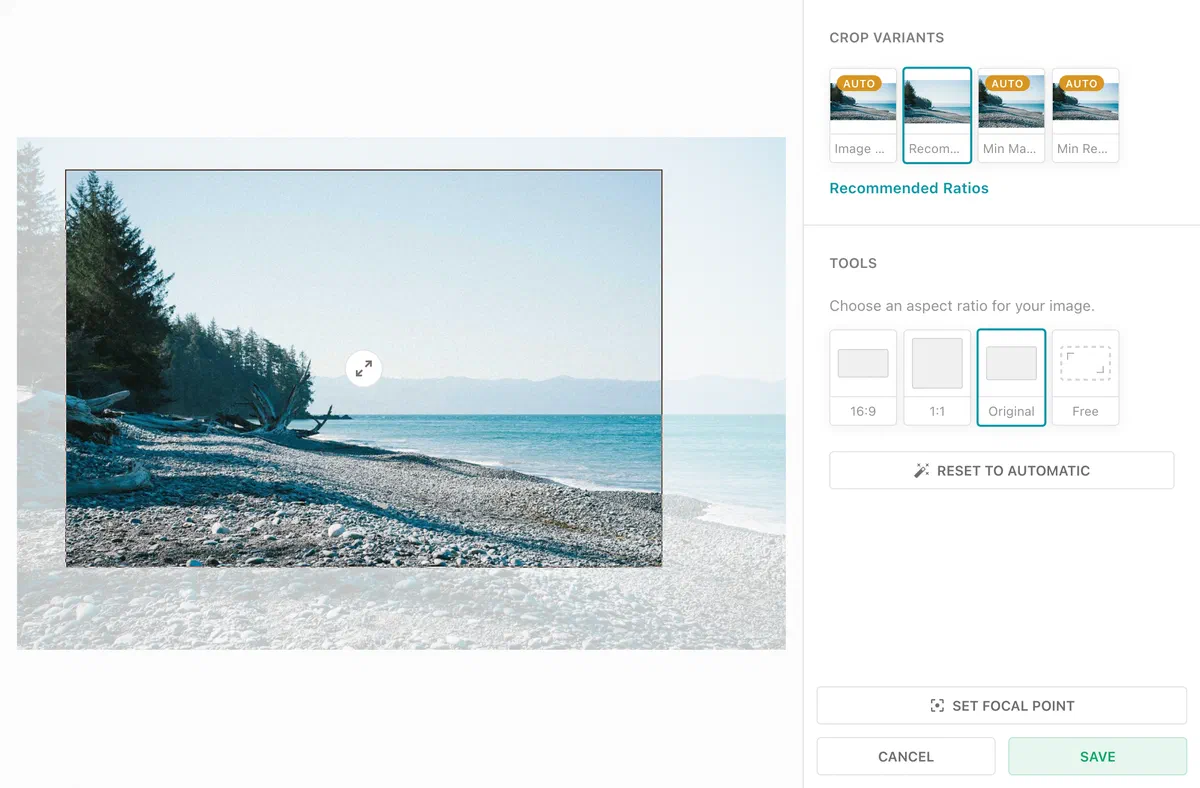
Ratios configured with recommendedRatios are now always enforced. The crop can be resized, but it keeps the selected ratio. Previously the ratio was dropped as soon as an editor resized the crop. For unconstrained cropping, the picker now offers an additional freeform ratio. In freeform mode, the current aspect ratio can still be preserved by holding the Shift key while resizing.
The behavior of imageRatios is unchanged. Those ratios are always enforced and there is no freeform option.
The new cropping tool is available automatically. No configuration is required.
For more information, see the doc-image directive documentation.
Search by Filename
Not every image arrives with a title or description. When metadata is missing, the filename is often the only thing that identifies an image. Editors can now search for images by their filename, and read or copy the full name straight from the detail view.
Find images by any part of the filename
Media Library text search now matches any part of a filename, not just the beginning. Matching is case-insensitive and needs at least three characters. Searching for AXZ87D3X finds imago-AXZ87D3X-john-doe-cc.jpg.
Substring filename search is opt-in. Recreate the media library Elasticsearch index only if you want the feature; until then, search keeps working as before, and it activates automatically the next time the index is recreated for any other reason.
livingdocs-server elasticsearch-index --handle li-media --recreate -y
--recreate deletes and rebuilds the index in place, so media search returns incomplete results while it runs (roughly 6,000 to 7,000 entries per second). Plan it for a low-traffic window.
Read and copy the full filename
In the media detail view, the “Information” section now shows the complete filename instead of truncating it to a single line. A copy button next to it grabs the full name in one click, which makes long agency filenames and stock IDs easy to reuse.
For more information, see the Searching by Filename guide.
Exact Number of Search Results
A search matching more than 10,000 images shows 10000+, which leaves editors guessing whether the archive holds 11,000 or 500,000 of them. An Exact Number button next to the capped count now resolves the real total on request.
The button appears on every Media Library dashboard and needs no configuration.
For more information, see the Media Library documentation.
Search Images by Usage Log Details
An image’s usage log records where and when it was used. Until now that information was not searchable: editors could filter by billing status, but not by the details that actually matter, such as “ran in print under politics” or “not used online in two years”. Editors can now search the media library by the contents of the usage log, and get back the images themselves rather than a list of log entries.
Every usage log entry is indexed on its own, so one query can match a single entry by its purpose, state, dates, user, billing flag, and any custom params at the same time. Searches run from a dashboard’s base filters or from the Expert Search field.
A new nested filter operator ties conditions to a single usage log entry, instead of matching them loosely across all of an image’s entries.
{
  "key": "usageLog",
  "nested": [
    {"key": "purpose", "term": "print"},
    {"key": "publicationDate", "range": {"gte": "now-2y"}}
  ]
}
To search by a purpose’s custom params, mark them with config: { index: true } in the paramsSchema.
The usage log fields are added by a media library reindex. Run livingdocs-server elasticsearch-index --handle=li-media after upgrading so existing entries become searchable. The mapping is patched in place, so no --recreate is needed.
The existing usageLogBilledEntryDates and usageLogUnresolvedBillingEntryDates display filters now use nested queries too, so they return no results until the reindex has run.
For more information, see the Usage Log, Search Filters and Expert Search documentation.
The aggregate usageLog.* filter keys this replaces are deprecated, see Deprecation of the Aggregate usageLog Search Fields.
Improved Image Collections
Image collections are where images are curated together for later use. They had fallen behind the media library dashboards: no lightbox navigation, no way to choose which tags show on cards, no download, and no way to configure the cards at all. Collections and document inboxes now behave like the media library.
- Lightbox navigation. Instead of viewing a single image, editors page through all items of a collection or inbox in the lightbox.
- Download. Single and batch downloads are available on collections, matching the media library. Collections shown in a modal or side panel stay read-only.
- Display settings. The display settings dropdown is now on collections and inboxes as well. Preferences are saved globally rather than per dashboard, so a choice carries across views.
- Drag and drop with multiselect. Multiple selected images can be dragged at once within a collection.
Configurable image cards
Image cards in collections and inboxes can now use a dashboardCardConfigurations entry, the same mechanism the media library dashboards use. The referenced configuration has to exist and be based on liMediaLibraryCard, otherwise project config validation fails. Where a card configuration adds metadata fields, the display settings dropdown gains a “metadata” option.
// project config
imageCollections: {
  useCardConfiguration: 'myImageCard'
},
contentTypes: [
  {
    handle: 'regular',
    inbox: {useCardConfiguration: 'myImageCard'}
  }
]
On media library dashboards the same property is called useCard, which is renamed to useCardConfiguration in this release - see Deprecation of dashboards[].useCard.
For more information, see the Image Collections guide and the content type inbox reference.
Image Card and License Improvements
License and tag information was not shown consistently across the product. The same image could carry a license badge in the properties panel but nothing on an approval task, and display settings were reset per dashboard instead of following the editor around.
This release lines that up. Media library tags now appear on the image and video properties panels and metadata panels, on license approval task thumbnails, and the media library detail view shows all tags including references. Display settings are shared globally instead of per view, and the tag tooltip finally reflects the actual asset type instead of always saying “image”.
The changes are available automatically. No configuration is required.
Disabling Image Editing
Not every setup can apply image modifications. When images are delivered by an external DAM instead of the Livingdocs serve-image endpoint, colour corrections, rotation and redaction made in the editor never reach the delivered image. Such setups can now turn image editing off.
With mediaLibrary.disableImageEditing, the “Adjust” button disappears from images in documents and metadata, and the redaction button disappears from the media library detail view. The server rejects the creation of image variants. Cropping stays available, and existing modifications are still applied.
The property requires configuration and is available from @livingdocs/server@312.0.22 and @livingdocs/editor@128.1.21:
 mediaLibrary: {
   use2025Behavior: true,
+  disableImageEditing: true
 }
It replaces mediaLibrary.disableImageEditingInDocuments, see Removal of mediaLibrary.disableImageEditingInDocuments.
For more information, see the Disabling Image Editing documentation.
Vulnerability Patches
We are constantly patching module vulnerabilities for the Livingdocs Server and Livingdocs Editor as module fixes are available. Below is a list of all patched vulnerabilities included in the release.
Livingdocs Server
This release we have patched the following vulnerabilities in the Livingdocs Server:
- GHSA-2x7j-588g-ccc2 patched in nodemailer v9.1.1
- GHSA-cc9r-2j5m-2m83 patched in nodemailer v9.1.1
- GHSA-wmmp-3585-3rmp patched in nodemailer v9.1.1
- GHSA-8m3c-c648-2xjj patched in nodemailer v9.1.1
No known vulnerabilities. 🎉
Livingdocs Editor
This release we have patched the following vulnerabilities in the Livingdocs Editor:
- CVE-2026-15074 / GHSA-83w8-p2f5-377r patched in @fastify/static v10.1.2
- CVE-2026-7120 / GHSA-8pvw-jcv7-9cmj patched in @fastify/static v10.1.2
- GHSA-pm4m-ph32-ghv5 patched in js-yaml v5.2.2
No known vulnerabilities. 🎉
Patches
Patches typically fix bugs and apply improvements within the current release. Keeping your deployment up-to-date with the latest patch version means you benefit from those fixes. No explicit action is required per patch — bumping the version is enough.
Livingdocs Server Patches
v312.0.21: fix(deps): automatically patch Node.js vulnerabilities
v312.0.20: fix(comyan): keep metadata validation errors on image upload
v312.0.19: fix(deps): automatically patch Node.js vulnerabilities
v312.0.18: fix(ci): mount the demo’s decompounder folder in the Downstream Demo job
v312.0.17: fix(publish-control): Skip empty and invalid metadata dates in visiblePublicationDatePreference
v312.0.16: fix(deps): update dependency proxy-addr from 2.0.7 to 2.0.8 [security]
v312.0.15: fix(deps): update dependency fastify from 5.12.1 to 5.12.5 [security]
v312.0.14: chore(ci): move livingdocsIO/actions to 1d986e6
v312.0.13: fix(ci): pin npm-tag-latest to the release that loads
v312.0.12: fix(deps): update dependency sharp from 0.35.4 to 0.35.5 [security]
v312.0.11: fix(migrations): Skip the reference index update when no reference changed
v312.0.10: fix(media-library): Preserve updateAt when modifying usage logs
v312.0.9: fix(imatrics-nlp): Match the API mock’s concept search against the search term
v312.0.8: fix: Use correct warning type for all breaking changes
v312.0.7: fix: Deprecate Postgres 14
v312.0.6: fix(deps): automatically patch Node.js vulnerabilities
v312.0.5: fix(deps): update dependency nodemailer from 9.0.6 to 9.1.1 [security]
v312.0.4: chore(benchmarks): import job-queue-scripts default export
v312.0.3: chore: Add fontconfig to server dockerfile
v312.0.2: fix(imatrics-nlp): Add createConceptSuggestion to the API mock and match the getConcepts shape
Livingdocs Editor Patches
v128.1.20: test(tasks): cover the other groups’ deadline sort and expanding the done group
v128.1.19: fix(auth): Decide a failed reissue by its outcome, not by the browser clock
v128.1.18: test(image-crop): cover named crops without ratios
v128.1.17: fix(deps): automatically patch Node.js vulnerabilities
v128.1.16: fix(properties): show delete button for components in ticker entries
v128.1.15: fix(deps): update dependency fastify from 5.12.1 to 5.12.5 [security]
v128.1.14: fix(deps): update dependency moment from 2.30.1 to 2.31.0 [security]
v128.1.13: fix(deps): update dependency @livingdocs/framework from 34.2.5 to v34.2.6
v128.1.12: chore(ci): wait up to 25 minutes for the unit tests before releasing
v128.1.11: fix(proxy): survive a browser that drops a websocket before the upstream upgrade
v128.1.10: fix(deps): update dependency @livingdocs/framework from 34.2.3 to v34.2.5
v128.1.9: test(ticker): Run the collaboration cases with two real users
v128.1.8: test(table-dashboards): Tighten the display filter assertions
v128.1.7: fix(deps): automatically patch Node.js vulnerabilities
v128.1.6: fix(media-library): show open state on display settings dropdown
v128.1.5: fix(webpack): Prevent dart-sass BOM from breaking scoped styles
v128.1.4: test(dashboard): restore an article on the article management dashboard
v128.1.3: fix(playwright): Use e2e-planning-system components in the publish control spec
v128.1.2: fix(deps): update dependency @livingdocs/framework from 34.2.2 to v34.2.3


