Caveat 🔥
These are the release notes of the upcoming release (pull requests merged to the main branch).
- ℹ️ this document is updated automatically by a bot (pr’s to categorize section)
- ℹ️ this document will be roughly updated manually once a week (put PRs + description to the right section)
- 🔥 We don’t guarantee stable APIs. They can still change until the official release
- 🔥 Integration against the upcoming release (currently
mainbranch) is at your own risk
PRs to Categorize
- feat(li-distribution-dates): allow the plugin in creation, copy and transform flows
- Serve multiple media library entry assets in a zip file
- Download multiple media library entry assets in a zip file
- Fix checkbox alignment and hyphenation in rubrics dashboard cell
- Show the configured ETC label and an hourglass icon
- Automate release tests and fix task board column totals
- Show media source titles like media library entry titles
- fix(deps): update dependency @livingdocs/framework from 34.4.4 to v34.4.6 (main)
- fix(deps): update dependency @livingdocs/framework from 34.4.4 to v34.4.6 (main)
- Fix causes of false editing conflicts, part 2
- chore(deps): update dependency prettier from 3.9.10 to v3.10.1 (main)
- fix(deps): update dependency @livingdocs/framework from 34.4.3 to v34.4.4 (main)
- Patch vulnerabilities [main]
- Patch vulnerabilities [main]
- Resolve a translated requiredErrorMessage to a string
- Use the external id index for media library lookups without a systemName
- Limit fast image processing to a customer feature
- Add a pre-upgrade check for referenced designs
- fix(editor): Keep the scroll position after a dialog or overlay closes
- Resolve userId base filters when searching a document by id
- fix(deps): update dependency @livingdocs/framework from 34.4.2 to v34.4.3 (main)
- fix(deps): update dependency @livingdocs/framework from 34.4.2 to v34.4.3 (main)
- Fix causes of false editing conflicts
- fix(metadata): declare required and requiredErrorMessage config for li-license-profile and li-media-handle
- Make @livingdocs/image an optional dependency
- Move main on to release-2027-01
- Enable the planning calendar for FAZ
- fix(dashboards): resolve userId patterns in kanban board filters
- chore(deps): update aws-sdk from 3.1162.0 to v3.1164.0 (main)
- chore(deps): update dependency sass from 1.107.1 to v1.108.0 (main)
- fix(media-library): Keep the remembered tab separate for each picker
- Fix loading the test factories from the published npm package
- Replace the unload listeners with pagehide
- Pass dashboard.get group policies on to the user
- fix(proxy): send the upstream host on websocket upgrades
- fix(deps): update dependency @livingdocs/framework from 34.4.0 to v34.4.1 (main)
- Patch vulnerabilities [main]
- Patch vulnerabilities [main]
- Use Document models and keep external system in minimal references
- Notify every draft save with the same realtime and server event payload
- Keep the task data when a task changes state
- Remove the license approval task when its images are removed
- Fail specs on Vue warnings
- fix(deps): update dependency @livingdocs/framework from 34.3.16 to v34.4.0 (main)
- fix(deps): update dependency @livingdocs/framework from 34.3.16 to v34.4.0 (main)
- Cut release-2026-11
- Cut release-2026-11
To get an overview about new functionality, read the Release Notes.
To learn about the necessary actions to update Livingdocs to release-2027-01, read on.
Attention: If you skipped one or more releases, please also check the release-notes of the skipped ones.
Webinar
- Feature Webinar Recording: TODO
- Feature Webinar Documentation: TODO
- Release Newsletter Subscription
System Requirements
Suggested
| Name | Version |
|---|---|
| Node | TBD |
| NPM | TBD |
| Postgres | TBD |
| Elasticsearch | TBD |
| OpenSearch | TBD |
| Redis | TBD |
| Valkey | TBD |
| Livingdocs Server Docker Image | TBD |
| Livingdocs Editor Docker Image | TBD |
| Browser Support | TBD |
Minimal
| Name | Version |
|---|---|
| Node (Server) | TBD |
| Node (Editor) | TBD |
| NPM | TBD |
| Postgres | TBD |
| Elasticsearch | TBD |
| OpenSearch | TBD |
| Redis | TBD |
| Valkey | TBD |
| Livingdocs Server Docker Image | TBD |
| Livingdocs Editor Docker Image | TBD |
| Browser Support | TBD |
Deployment
Before the deployment
No pre-deployment steps are required before rolling out this release.
Rollout deployment
Migrate the Postgres Database
No migrations are required for this release.
After the deployment
No post-deployment steps are required after rolling out this release.
Rollback
No rollback steps are required for this release.
Breaking Changes 🔥
Deprecations ⚠️
Features 🎁
Clearer Display of the Estimated Time of Completion
For content types with an li-estimated-time-of-completion metadata property, the estimated time of completion is now shown with the property’s ui.label and an hourglass icon, instead of a generic “ready”. For example, “ready at 07.01.2027” becomes “Ready for publication on 07.01.2027” for a property labeled “Ready for publication”.
As before, the estimated time of completion is shown on dashboards, in the editor toolbar and on Planning Calendar cards when a document has no publication date yet.
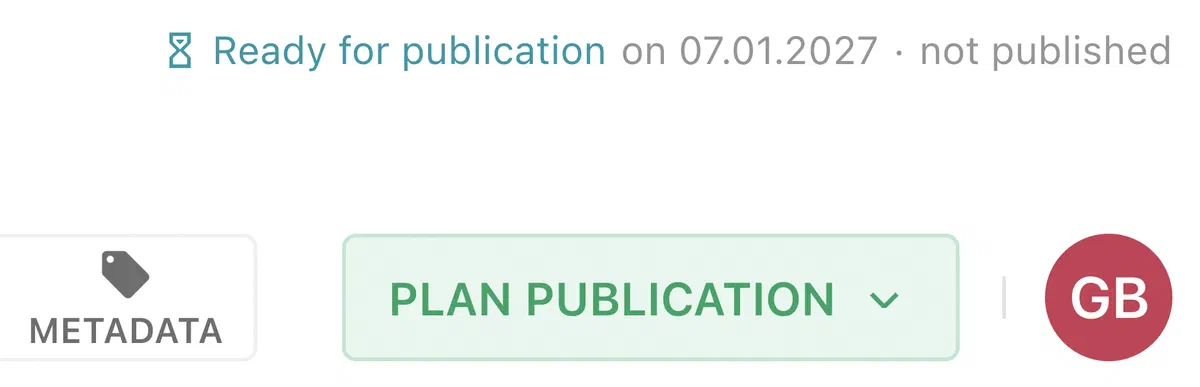
The change is available automatically. If your label is missing or has no text in an editor’s UI language, a fallback is shown instead.
 Check that your label reads well in front of a preposition and a date, e.g. “on 07.01.2027”, in every UI language your editors use, and that a new label still works in the metadata form.
For more information, see the li-estimated-time-of-completion documentation.
Distribution Dates in Creation Flows
Editors can now set distribution dates while they create a document, so creating and planning a document takes one step instead of two. The document shows up on the Planning Board and the Planning Calendar right away. The same field also works in copy and transform dialogs.
To enable it, add li-distribution-dates to the paramsSchema of a flow and store the dates in your create, copy or transform function:
// editorSettings.documentCreationFlows[]
paramsSchema: [{handle: 'distributionDates', type: 'li-distribution-dates'}]

// your create function
metadata: {distributionDates: params.distributionDates}
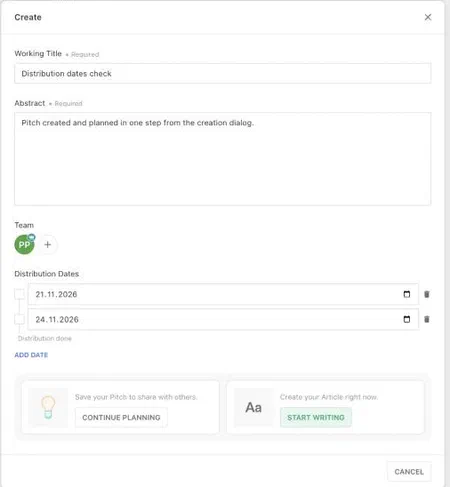
For more information, see the li-distribution-dates documentation.
Vulnerability Patches
We are constantly patching module vulnerabilities for the Livingdocs Server and Livingdocs Editor as module fixes are available. Below is a list of all patched vulnerabilities included in the release.
Livingdocs Server
This release we have patched the following vulnerabilities in the Livingdocs Server:
- TBD
No known vulnerabilities. 🎉
Livingdocs Editor
This release we have patched the following vulnerabilities in the Livingdocs Editor:
- TBD
No known vulnerabilities. 🎉
Patches
Patches typically fix bugs and apply improvements within the current release. Keeping your deployment up-to-date with the latest patch version means you benefit from those fixes. No explicit action is required per patch — bumping the version is enough.


