---
title: Image
description: The image directive declared on `img` tags enable a user to make the image editable.
---
If defined on an `![]() ` tag, enables users to set the src attribute.
If defined on any other tag, enables users to set a background image CSS property to that tag.
## Example
```js
{
name: 'image',
label: 'Bild',
iconUrl: `https://livingdocs-assets.s3.amazonaws.com/magazine-design/assets/images/icons-components/icon_image.svg`,
directives: [
{
name: 'image',
type: 'image',
recommendedRatios: ['16:9', '1:1', '4:3', '3:4'],
srcSet: {
defaultWidth: 1024,
widths: [2048, 1024, 620],
sizes: ['100vw']
}
}
],
html: dedent`
`
}
```
## Config Options
### Ratios
The image ratio definitions control how the crop tool in the Livingdocs editor is configured.
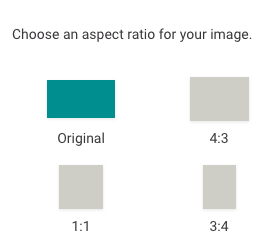
There are two ways to configure how the crop tool behaves. If you configure `imageRatios`, one of the given ratios is enforced.
If you configure `recommendedRatios`, the given ratios are presented to the user, but a custom aspect ratio is possible.
`imageRatios`: array of strings, an array of strings, e.g. '16:9'
`recommendedRatios`: array of strings, an array of strings, e.g. '16:9'
### Named Crops
Alternatively to `imageRatios`/`recommendedRatios` you can configure `namedCrops` if you are using that system.
To understand what Named Crops are, read the [Media Library Guide](/guides/media-library/media-library-setup/llms.txt).
### SrcSet
The srcSet defines the parameters for [HTML srcsets](https://developer.mozilla.org/en-US/docs/Learn/HTML/Multimedia_and_embedding/Responsive_images). If set, Livingocs will generate a `srcSet` attribute on the HTML tag where the image directive is defined. There is a global (instance-wide) default for `srcSet` and image directives can overwrite this.
Schema:
```
srcSet: ms.obj({
defaultWidth: 'number',
widths: ms.arrayOf('number'),
sizes: ms.arrayOf('string')
})
```
For an example see at the top.
### Background images
If the `doc-image` directive is used on any other tag than `
` tag, enables users to set the src attribute.
If defined on any other tag, enables users to set a background image CSS property to that tag.
## Example
```js
{
name: 'image',
label: 'Bild',
iconUrl: `https://livingdocs-assets.s3.amazonaws.com/magazine-design/assets/images/icons-components/icon_image.svg`,
directives: [
{
name: 'image',
type: 'image',
recommendedRatios: ['16:9', '1:1', '4:3', '3:4'],
srcSet: {
defaultWidth: 1024,
widths: [2048, 1024, 620],
sizes: ['100vw']
}
}
],
html: dedent`
`
}
```
## Config Options
### Ratios
The image ratio definitions control how the crop tool in the Livingdocs editor is configured.

There are two ways to configure how the crop tool behaves. If you configure `imageRatios`, one of the given ratios is enforced.
If you configure `recommendedRatios`, the given ratios are presented to the user, but a custom aspect ratio is possible.
`imageRatios`: array of strings, an array of strings, e.g. '16:9'
`recommendedRatios`: array of strings, an array of strings, e.g. '16:9'
### Named Crops
Alternatively to `imageRatios`/`recommendedRatios` you can configure `namedCrops` if you are using that system.
To understand what Named Crops are, read the [Media Library Guide](/guides/media-library/media-library-setup/llms.txt).
### SrcSet
The srcSet defines the parameters for [HTML srcsets](https://developer.mozilla.org/en-US/docs/Learn/HTML/Multimedia_and_embedding/Responsive_images). If set, Livingocs will generate a `srcSet` attribute on the HTML tag where the image directive is defined. There is a global (instance-wide) default for `srcSet` and image directives can overwrite this.
Schema:
```
srcSet: ms.obj({
defaultWidth: 'number',
widths: ms.arrayOf('number'),
sizes: ms.arrayOf('string')
})
```
For an example see at the top.
### Background images
If the `doc-image` directive is used on any other tag than `![]() ` it will automatically be set as a background image.
Background images don't have srcSet properties (see above). Thus you can define a max width that should be used under the directive config key `backgroundImage`.
Example:
```
backgroundImage: {
maxWidth: 1024
}
```
` it will automatically be set as a background image.
Background images don't have srcSet properties (see above). Thus you can define a max width that should be used under the directive config key `backgroundImage`.
Example:
```
backgroundImage: {
maxWidth: 1024
}
```